Label Numbering by Group Instead of Overall Count

Good afternoon!
I need some help. I'm creating a label that contains a list of 5 items. I managed to set it up by following this post:
https://support.seagullsoftware.com/hc/en-us/community/posts/38928267749527-Label-A4-with-a-lists-of-Items-Qty
However, I'm having trouble displaying the label count correctly.
When the records are grouped into sets of 5, I get 3 labels, and the numbering is currently displayed as:
Label 1 of 1
Label 2 of 2
Label 3 of 3
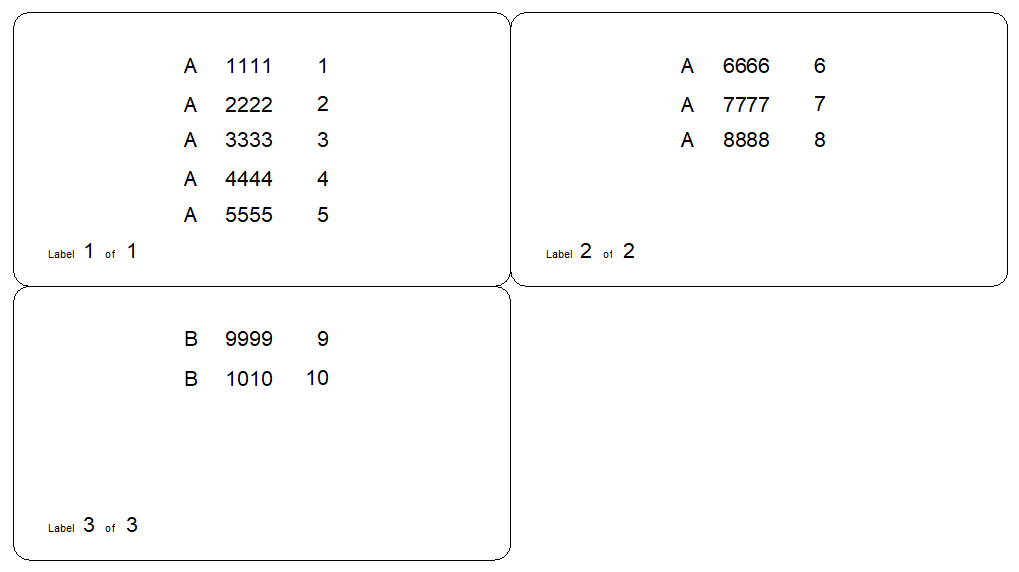
My database looks like this:
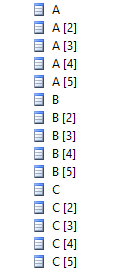
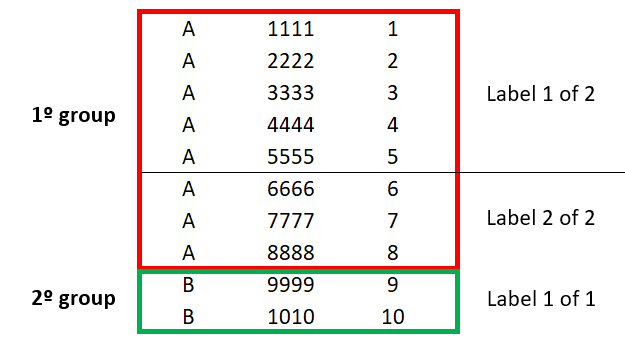
What I'd like is for the total number of labels to reflect the quantity within each group.
For example, if the first group generates two labels, it should display:
Label 1 of 2
Label 2 of 2
And if the second group generates only one label, it should display:
Label 1 of 1
I was able to partially solve the problem by using serialization. With it, I can count the labels and reset the counter whenever the database group changes. However, I still haven't found a way to determine the total number of labels that will be printed for each group, so I can't display the "Label X of Y" format correctly.
I am trying to create a VBScript based on the example from this post:
https://support.seagullsoftware.com/hc/en-us/community/posts/213180788-Vb-Script-On-Calculation
However, I was not able to achieve the expected result.
IF Format.NamedSubStrings("TotalQty").Value MOD Format.NumberSerializedLabels = 0 THEN
Value = Format.NamedSubStrings("TotalQty").Value / Format.NumberSerializedLabels
ELSE
IF CInt(Format.NamedSubStrings("SerializedNumber").Value) < CInt(Format.NumberSerializedLabels) THEN
Value = Int(Format.NamedSubStrings("TotalQty").Value / (Format.NumberSerializedLabels - 1))
Else
Value = Format.NamedSubStrings("TotalQty").Value - ((Format.NumberSerializedLabels - 1) * Int(Format.NamedSubStrings("TotalQty").Value / (Format.NumberSerializedLabels - 1)))
End If
End If
Is there a way to achieve this in BarTender? Any guidance would be greatly appreciated. Thank you!
-
I dont think the VB routine forum post is what you are looking for to print 1 of 2, 2 of 2, 1 of 1 etc automatically from x selected records.
What you need is some way to count the number of identical records then divide that by 5 (rounding up) and set that as the Y of the X of Y., but I cannot see any way to do that with the options in BarTender and VB automatically. The X part can be configured to reset to 1 when a data field changes quite easily, but that isnt a lot of use without the Y.
You may be able to get this to work if you manually specify the number of lines/records of a given type there are and have a counter that increases for each data change (ie A to B etc) and then have a VB routine to control the values of Y but this could be quite complex to setup and get it to work .
0

請登入寫評論。
評論
1 條評論