Bartender Overwriting Offset Settings

We currently have bartender set up for our production use. We have around 30 printers configured but we are having issues with a singular one's settings getting overwritten, causing our printer to print with the incorrect offset. The printer that is being overwritten seems to share all the same settings and configurations inside of printer defaults and preferences. Is there something else to this puzzle that I could be missing? We have also attempted to manually adjust the offset of the printer and this had no effect on our print. In case you are curious, the printer model that we are using is a Zebra 105SL with a 300 dpi head. It is the only printer we own in that model/driver. Any advice will be greatly appreciated.
-
If using a Seagull driver make sure the settings on the Document Properties Options and Stock tabs are set to Use Current Printer settings and the Offsets are set to zero, this should then use the settings set in the front panel of the printer.
For the ZDesigner driver adjust the settings on the Document Properties> Print Options to Use Settings set on Printer by clicking on the pen/pencil and amend the dropdown
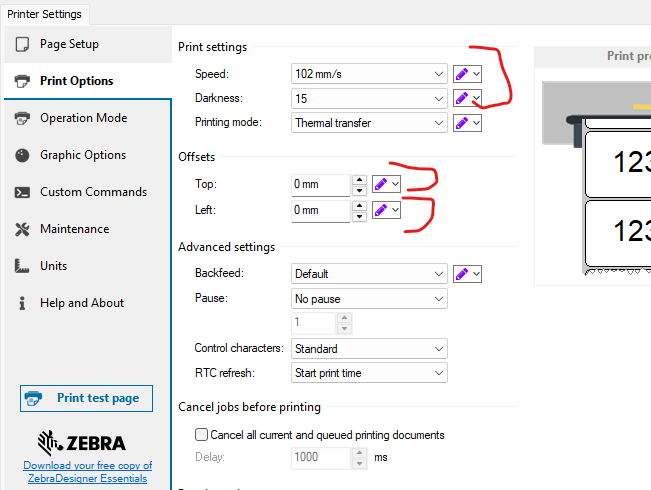 0
0

請登入寫評論。
評論
1 條評論