How do I Change the starting number when recording the page number on each label?

Lets say I have an outgoing load that consists of 20 pallets, well those 20 pallets will likely include more than one variety of product. Of 20 pallets, 1-5 could be product A, 6-15 could be product B, etc... In this scenario I need to be able to switch to a different product/pallet label, but continue the numbering for the whole load. After I print the first 5 pallet labels for product A, I need to print the next 6-15 for product B starting on Pallet 6. I've been trying to find what I need in the "Print Job Field" but nothing will let me start pallet numbering at a different number.
-
Hi Andrew,
Thank you for reaching us via the Community Forums!
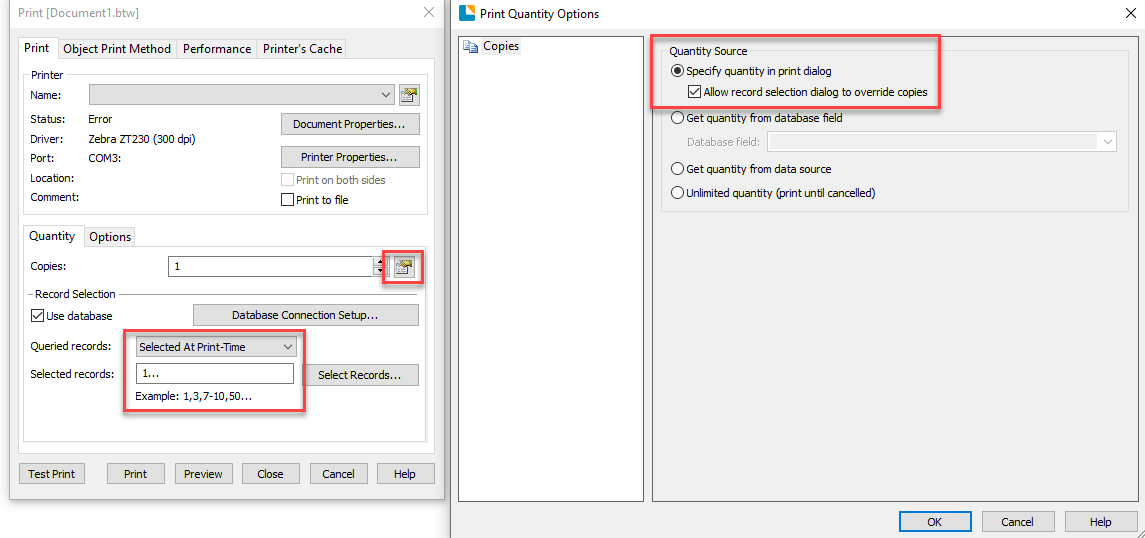
I believe you could achieve this by accessing the Print tab and then navigating to the Print Quantity Options and selecting "Allow record selecting to override copies", and afterward changing the Queried records to "Select at Print Time":
With this, you should be able to select the number of copies for each product in your database: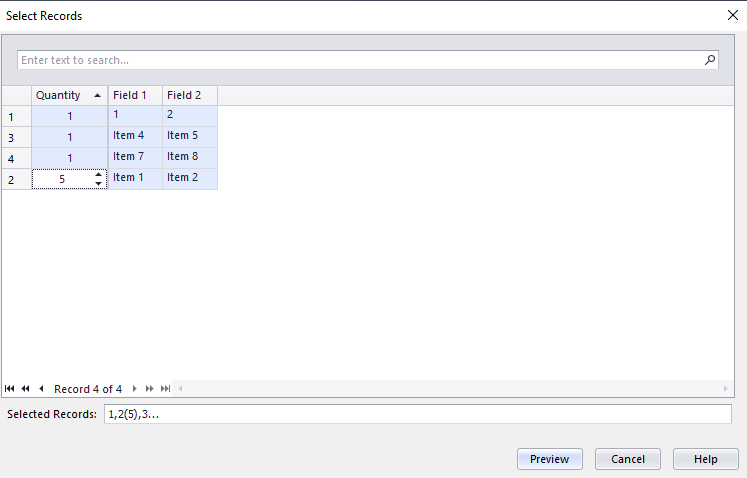
I hope this helps!
0

请先登录再写评论。
评论
1 条评论