designated printer by label

I have two UPS LP2844 printers. One is loaded with 4x6 labels and the other is loaded with 2x1 labels. In a label designated 2x1 it automatically goes to LP2844 and the 4X6 label go to LP2844 copy 2. until a resent update of my Cougar Mountain software the label Named 1XBM is going to LP2844 copy2. Now it is going to LP2844. How is the destination printer set up in the label designated 1XBM
-
Hello John,
Welcome to the BarTender Community!
If you need to change the printer used to print a certain label, you will need to open said label via BarTender Designer and navigate to the File > Print... tab on the upper menu: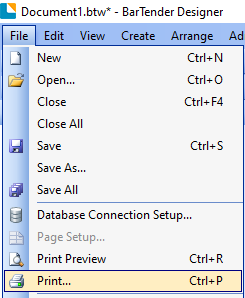
This will display the BarTender Print menu, if you click on the Printer Name option highlighted in red in the screenshot below, you should be able to replace LP2844 with LP2844 copy 2: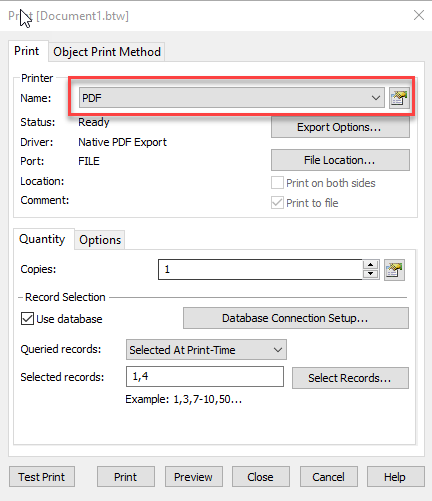
Then, just click on Print.
Hopefully, this will do the trick. If not, please let us know!0

请先登录再写评论。
评论
1 条评论