Creating a template for continuous roll label using Primera LX2000 printer

Hello there,
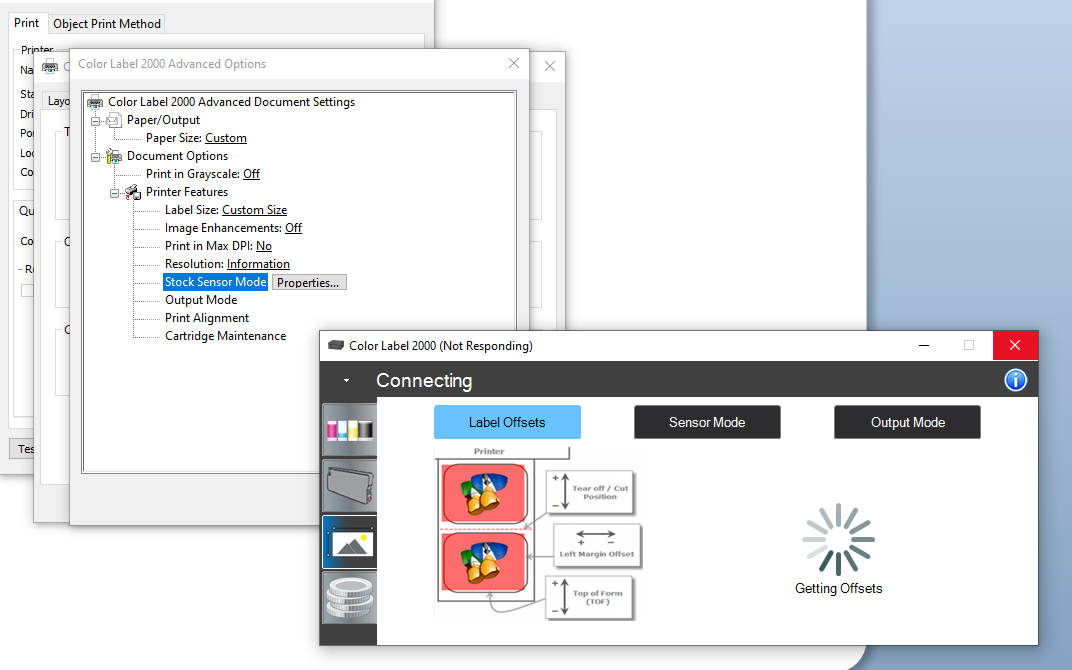
I'm not having much luck finding the settings to be able to set up a label template in Bartender using a continuous roll label with a Primera LX2000 printer. The options to choose continuous roll using printer settings - stock options, etc. as highlighted in other posts is not displaying as options on my end.
I've set the label settings to my desired size; however, when I go to print it says the printer cannot find the end of the label and I cannot locate the options to choose continuous stock and set up the cutter settings. I've looked and Primera LX2000 can accommodate continuous roll labels.
Thanks for any help!
-
You need to adjust the Sensor Mode to Continuous in the Document Properties>Advanced>Stock Sensor Mode>Properties settings. As I dont have one of these printers attached I can not access the correct screen but I believe this should be in the Sensor Mode page option
 0
0 -
Thank you, BarTender Hero Peter! I was able to locate the settings and make the changes to support what I'm looking for.
0

请先登录再写评论。
评论
2 条评论