Warning Message #2604

I am getting the Warning Message #2604 which reads
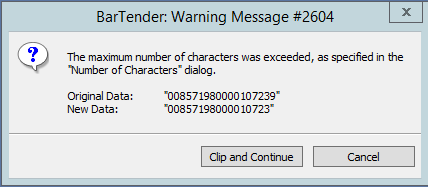
This is data is pulling from a database and no where did I specify a certain "Number of Character" to be printed. I need the whole string of the original data printed, not the trimmed new data.
Is there an override for this warning without losing any data?
-
Hello David,
The number of characters is set on the Transforms tab and it depends on your data source. If you have a barcode that follows specific standard, that will be set automatically within Bartender.
To check the Number of Characters for that specific data source, right-click the text object or the barcode that you are getting the error message 2604 and check if it's set for an specific minimum number of characters.
-
Flavia,
Thank you I was able to figure out the fix on my own. The issue was that I didnt realize that BT was assigning the check digit which I had already calculated. Now I have different issue with the Barcode not scanning. I will start a new thread to try and get resolution.
Thanks again.
0

请先登录再写评论。
评论
2 条评论