Bartender to ZM400 Printer Settings

Hello,
We have relatively recently moved a Zebra ZM400 printer from one site to another. On setting it up I have found that when trying to print any label that has been previously created the print settings become corrupted when going to print. The printer is set to continuous thermal transfer (both in the printer and in the software) but when trying to print the paper spools out for approximately 300mm. The printer then errors with 'Paper Out' and on inspection the settings have changed to 'web sensing' so it's clearly looking for the end of the label. Restarting the printer after a prolonged power off period occasionally works but is not consistent. Usually, no matter how many times I change the settings, it defaults back to web sensing and gives a print error. When it does work it works great. Thinking it may be a driver issue somewhere?
The printer is being accessed through another PC for reference, however this has happened before on the local machine.
Kind regards,
James
-
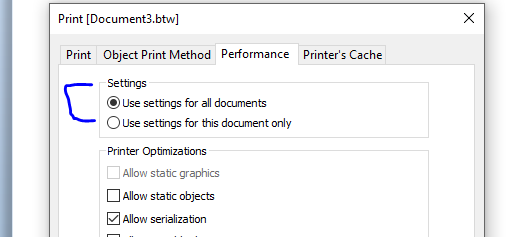
I would suggest that you use the Seagull Zebra driver in all instances and make sure all of these are either set to Use Current Printer settings (ie the front panel settings of the printer) or are all set to Continuous. You will also need to make sure that every label template is set to the same and Print>Performance screen is set as below for each of them.
It sounds to me like somewhere, either a label or a printer driver setting is set to Transmissive/Gap sensing and is then making this the new default for the printer
 0
0

Vous devez vous connecter pour laisser un commentaire.
Commentaires
1 commentaire