bar code with a different font

Hello. Tell me please, how to make in BarTender (version 10.0 Automation single user), a part of the bar code with a different font size? I need to be the first 6 digits of the bar code were smaller in size than the next 8 digits. Thank you. Example barcode: xxxxxxxXXXXXXXX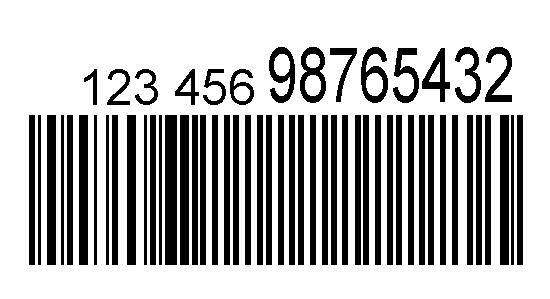 Thank you.
0
-
What you will need to do is turn off the human readable and create a separate text object that links to the barcode data to do this.
- First, you will need to create multiple data sources for the different font/size and each data portion of the barcode.
- Go into the barcode properties->human readable->set visibility to none.
- Create a new text object to be used.
- In the text object, you will need to create the equivalent number of data sources. In each data source, you will want to link it to the equivalent data source you created in your barcode. This is set by selecting the data source on the left pane of the text object properties->data source tab->clicking on the name property option.
- On the text object, go the font section on the left pane. Now you see a "font per data source" option. This will allow you to set a specific font/size to a data source you created earlier.
0

Vous devez vous connecter pour laisser un commentaire.
Commentaires
1 commentaire