PDF created by integration not same as PDF from "MS Print to PDF"

Purpose of creating a PDF is to pass it to Vericut so a Cutter/Plotter can cut out a Stencil. The label template uses TTF "Stencil Gothic JL" in Bold at size 22.
PDF file created by our Bartender Integration looks correct in MS Edge but when importing the that PDF file into Vericut the font changes.
Oddly, if we view the PDF in Edge and then “Print to PDF” using “MS Print to PDF”, the new file created imports into Vericut with the correct Font intact.
What is the difference between the integration PDF generation and MS Print to PDF? How can I make our integration PDF more like the MS Print version so that Vericut will maintain the desired font?
Thanks,
Darron
-
Set the driver in the Integration to the MS Print to PDF driver rather than Seagulls inbuilt PDF driver and see what that does
-1 -
I don't see how I can set the integration to use MS Print to PDF.
0 -
I don't see an option to get the integration to automatically use MS Print to PDF.
Also, is there a parameter I can pass to the integration to make it overwrite existing file and not append numbers to make it unique? I pass it the PRNFILE parameter to tell it where to create the file and how to name it, but I need to also tell it to overwrite without having to modify 200 different printer templates. I'm currently passing /D /PRN /PRNFILE /P /C /R /Close /DD
0 -
You can reference it from here:
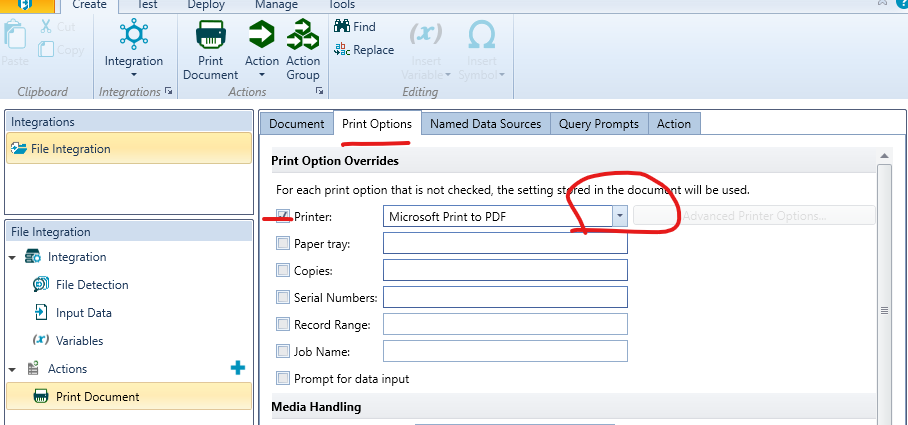
You should be able to adjust the settings on the File Detection tab to do this. Although from you command string the /DD should do it but I wonder if that needs to be before the /Close
-1 -
The Integration selects the printer dynamically and ONE of those printer options is “Print to PDF”. The configuration suggested above would send every print job to Microsoft Print to PDF rather than use the printer selected in the file. I want the user to pick a printer as they usually do, but if they select “Print to PDF”, then I want it to use the MS version of print to PDF, rather than the one built into the integration. I see no way to make it act that way.
0 -
The only possibility I can think of for this would be to have 2 separate integrations. One that prints to a selected printer and a separate one that always does MS Print to PDF. My middleware currently applies a file suffix that the integration recognizes. If I apply a different suffix when a PDF is desired, and build another integration to only deal with those files, then this might work. It sounds like a long way around to solve the problem though. And I'm not sure how I'd specify the filename or if MS Print to PDF would have to prompt for it every time.
0

Iniciar sesión para dejar un comentario.
Comentarios
6 comentarios