Problem with serialization printing from some computers

Dear All,
I am running into a problem with print station. I am creating pallet labels for our products. On every pallet we have 4 sides, thus 4 labels with the same numbers are needed.
I have used Serialization settings and everything is working the way I want on my own laptop with full bartender reading an writing permission. Print preview gives pallet 1, 1, 1,1 Pallet 2,2,2,2 Pallet 3,3,3,3 Pallet 4,4,4,4 etc. when I send the print job to the printer it will print the labels perfectly.
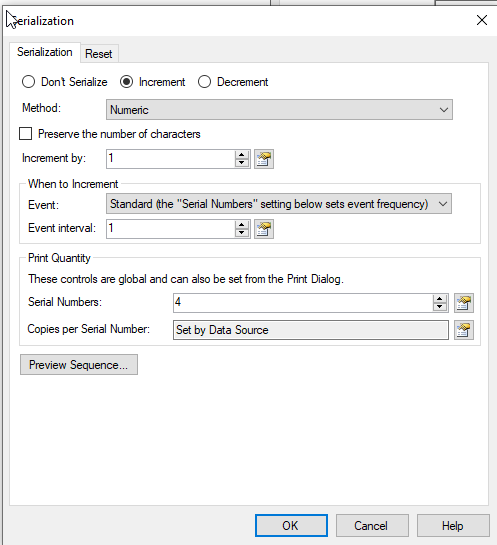
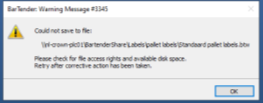
However, when I am printing from the remote desktop with limited (no saving) access. The print preview gives the correct settings, printing the labels like pallet 1, 1, 1,1 Pallet 2,2,2,2 Pallet 3,3,3,3 Pallet 4,4,4,4. However when I send the print job to the printer I will get a warning and the printer prints the labels as following:
pallet 1, 2, 3, 4 pallet 1, 2, 3, 4 pallet 1, 2, 3, 4 pallet 1, 2, 3, 4
How do I solve this issue?
-
It is clearly a permissions issue and BarTender needs to be able to store the label into temporary memory in order to achieve the printing sequence and it so it looks like you will need to use an account with enhanced permissions in order to achieve this.
0 -
The problem is solved. It turned out that installing/reinstalling the printer drivers solved the issue. I still get the notification about not being able to save, but the printing order is now pallet 1, 1, 1,1 Pallet 2,2,2,2 Pallet 3,3,3,3 Pallet 4,4,4,4 again!
0 -
Hi Denise! We are glad to know the issue was resolved and thank you for sharing the solution with the rest of the Community! :)
0


Please sign in to leave a comment.
Comments
3 comments