Print station don´t show all records in dropdown-list

We have today started Bartender 2021 R8 in production after migrating from v10.0, when i realized that if I have more records then around 500, Print station don´t show them all in dropdown-lists.
We have several templates with similar problem.
The templates has a dropdown-list, filled with records from excel-file via VB.
The design was working in the old version of bartender before we migrated, it works in the new version in bartender if we use BarTender, but in Printstation it don´t show them all.
If I make a new template, and only place a dropdown-list there, and use the VB-script, the problem behaves the same.
What can make Printstation produce different result than Bartender?
-
Hello Lennart,
Thank you for bringing this issue to our attention. This is a known bug that is currently being worked on by the development team. As soon as they have a resolution in place for an upcoming BarTender release, I will notify you.
Once we have a fix on a newer version, you will need to update your current revision of BarTender. Updating BarTender to a new release of the same version is usually a straightforward process. As long as the same printers and drivers are in use, it usually does not affect the templates as much as upgrading from one version to another (e.g., from BarTender 2016 to BarTender 2019). However, if you have another computer available, you may wish to install the new release separately and test some of your templates to verify that there are no major changes.
Here are the download and support article links again for your convenience.
Having said that, we currently have a workaround in place for this issue: We can change the Source of the items in the dropdown list. If we look in the List Items property for the dropdown list, it appears the list items are currently sourced from "File Names in Folder", and specifically the E:\Database\ResinDesigns folder. However, the limitation on the list length does not seem to occur when the Source is set to "Database".- Is there a field in the ERP database that includes the name of the image file required for each record? If so, the dropdown list (and the image object on the label) could be set up so that the image file path is drawn from the database field instead of the folder contents.
- (If you make any changes to these settings, please make a test copy of the label file first.)
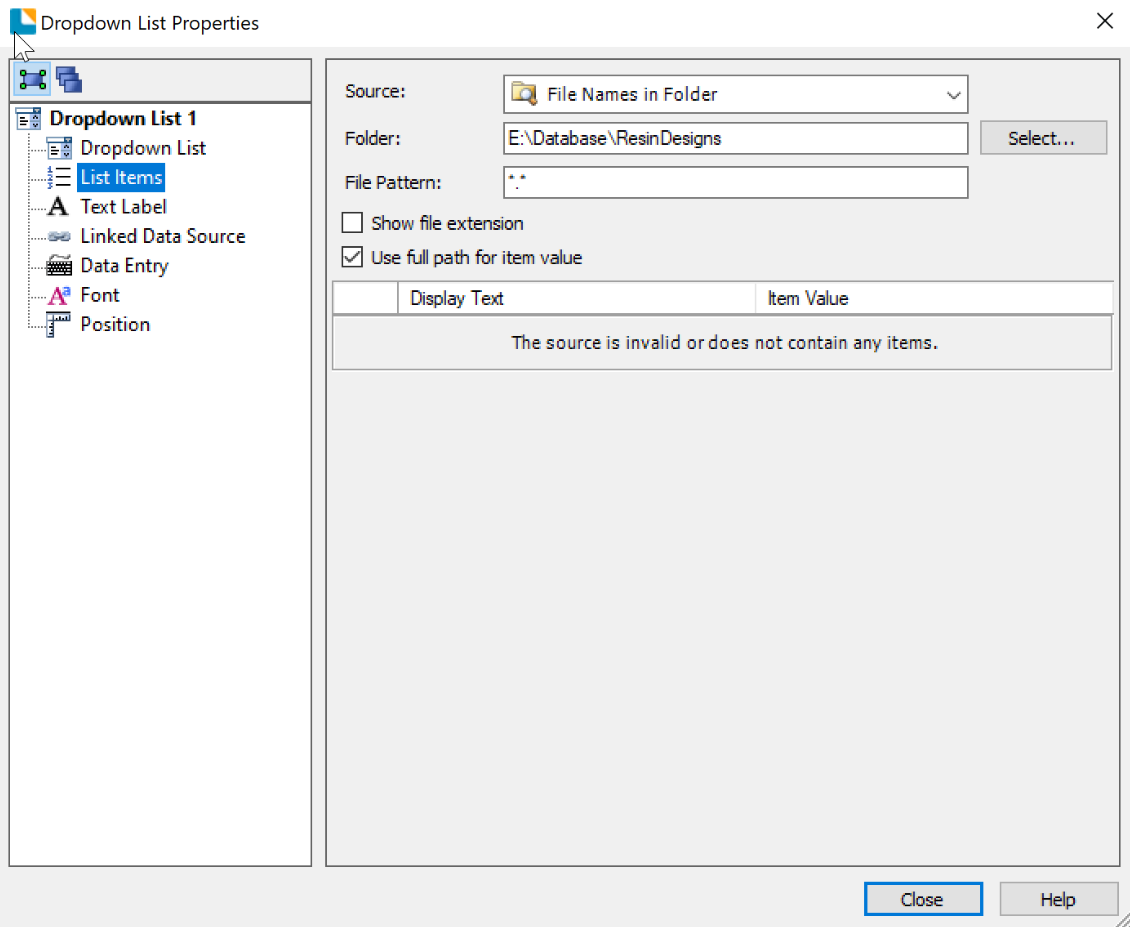
I hope this information was of use to you and please, feel free to reach us again if you have further queries or issues related to BarTender.0 - Is there a field in the ERP database that includes the name of the image file required for each record? If so, the dropdown list (and the image object on the label) could be set up so that the image file path is drawn from the database field instead of the folder contents.
-
Hello.
I have now tested version 2022, and in printstation you can now search for every item in the list, but you can not scroll the list.
And the other problem i have now, is that if Root-folder exist on a network drive, i get the wrong path when printing.
path: x:\company\department\labels\BT2022\my_lable_to_print.btw
Rootfolder: x:\company\department\labels\BT2022
Namne: BT2022
At Printing i get: An error occurred while loading the document x:\company\department\labels\BT2022\labels\BT2022\my_lable_to_print.btw
The resulting path has repeated part of the path for some reason. But having the exakt same path on c: works.
0 -
Hello, I have now read the release notes for version 2021 R9, and can not find any reference to my problem with printstation only shows 500 posts.
At the moment, when users at the printstation needs to select a post below #500, I´m contacted and I have to teamview in and make the printout manual in bartender instead.
This has to be fixed! I cannot update to 2022 due to network problem stated in my last comment, and a separate case.
And I have not been able to make the workaround Xabier wrote, work for us.
0 -
Hello Lennart,
I have the same issue as you with Print Station on BT2022 when trying to print a document that is on a shared folder.
I could access it with Bartender 2019 without any issue.
Looking at the article here: Updates to Print Station and Print Portal in BarTender 2022 – BarTender Support Portal (seagullscientific.com), it seems that they are now using the same framework as Print Portal, so it runs under the credentials set to run the Bartender Print Scheduler service.
See the Known Issues part of the article:
- You may encounter an error that Print Station is unable to find or load a document when printing a document stored in a network share location. A Windows user account with permissions will have to be explicitly set on the BarTender Print Scheduler Windows service.
I've tried the following:
-Change the service account to Network Service then restarted the service and the other bartender services
-Granted the machine account read access to the folder set in Print Station
-Changed the Print Station template path to the UNC path in Print Station settings
It still does not work unfortunately but now the error message is different...
I'll continue to search on this issue but at least you know you're not the only one having the issue!
0


Please sign in to leave a comment.
Comments
4 comments