Bulk print .jpg/.pdf with database field as filename when exporting

Hi,
I'm running BT 2021 R1 Enterprise and all my templates are connected to a SQL database using a predefined query which is working fine.
I am now trying to print a label preview of all the results in my query (1000+) in either .jpg or .pdf format to use in another application. And when the file is being printed it should automatically use a database field name from that same query as the file name. I don't want to rename every file name or export 1 by 1 to achieve this result.
Can this be done? If so, what are the steps?
Thanks!
-
On the Print Screen you can configure the PDF printer settings to make the name of the file either name of the label format, the content of a Named Data Source (as per the screenshot below) or a database field so hopefully that is what you are looking for.
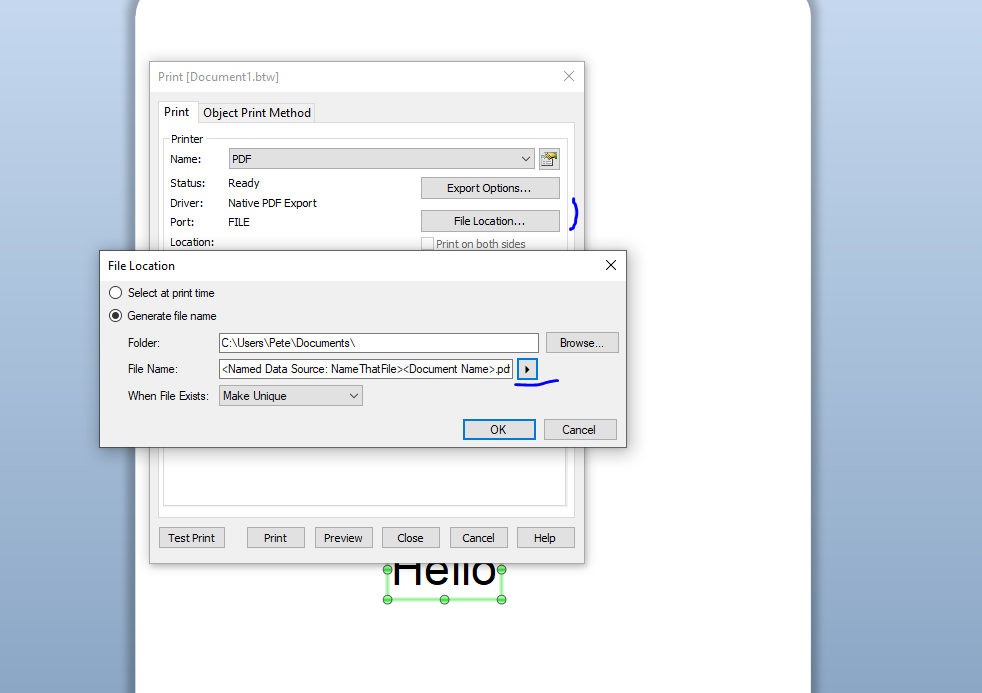
Please note that each 2000 pdfs will take up 1 printer licence.
1 -
Hi Pete,
Thanks for the info, I'm halfway there with your suggestion.
I can now bulk print all my labels, the only downside is that these are generated in 1 big PDF so only 1 unique file name.
I can do a split PDF afterwards to have separate pages but the unique filenames are still missing.So I'm still looking for a complete solution to my problem :)
1 -
Anyone with an answer on this issue. I'm having the same problem.
0 -
Just posted a possible solution to your post on https://support.seagullscientific.com/hc/en-us/community/posts/4466735913495-Printing-from-database-to-pdf-save-each-label-to-a-new-pdf-?page=1#community_comment_4467044658839
0


Please sign in to leave a comment.
Comments
4 comments