Move file to folder based on current date

Not sure if this is possible or not. I'm trying to get files that have successfully printed via file integration to be moved into a folder based on the date the integration triggered:
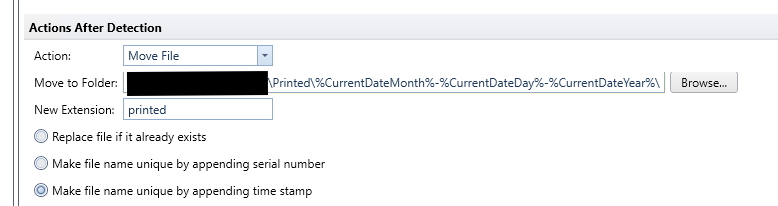
I thought this might work, but it seems it retains the value of the date variables based on when this integration was deployed and not the time the integration event gets triggered. So everything is still being dumped into a previous date folder.
Is there a better option for this?
-
Do you actually need to retain the files or could you just log the printed output and reference/check History Explorer to the see them?
0 -
Great question. One of the main things I'm trying to determine is I have users complaining that occasionally they do not get prints on our test stations. These serial labels are automatically generated from our ERP after certain barcode scans at these test stations. I'm trying to see if the file ever gets generated to begin with. Is our ERP glitching and not producing the file, or is BarTender glitching and the print isn't getting to the printer?
Having the file there (or not!) would point me in the right direction for that. Maybe the History Explorer can accomplish that too?
0 -
The folder is created using the %Current Day% value at the time the file is created and so that option wont work.
For testing purposes you could move the trigger files to a new folder for now and when I label does not appear, check History Explorer to see if an error has been logged and also check the folder to see if a file was created which may help you work out where the system is going wrong.
There is an Integration %Event Time% option but that cannot be used at this stage a file is created to make a new folder (it just creates a folder named %Event Time% which is of no use at all)
0

Please sign in to leave a comment.
Comments
3 comments