Delete printing counter

Hi,
We are using BarTender Designer 11.5.1 connected to a database gathering all our references.
When printing 30 different references labels as a pdf, a window shows a counter going from 1 to 30, which is normal:
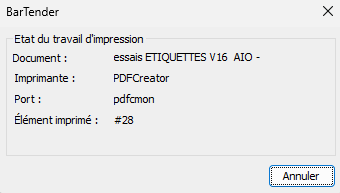
The problem is that, when printing on a paper printer a single reference in 30 copies, the window also shows the counter up to 30, which has no use, just preventing to prepare the next printing. The order should simply add to the printer queue and then the printer does its job.
Can this be solved in the parameters?
-
Up! We would really love to have some advice on this topic!
Thanks
0 -
This forum looks pretty quiet….
Discussing with our reseller, he suggested to deactivate the “Activate page model” in the settings, which deleted the counter while printing labels. Problem is solved. Even if we do not understand clearly why…
Hope that it can help someone one day!
0
Please sign in to leave a comment.
Comments
2 comments