Filter by non-blanks in record picker

I have a record picker with the following properties set:

It is linked to an Excel file where some of the records are empty. I only want to display non-blank records.
If I right click in the record picker when printing I can set to filter by non-blanks
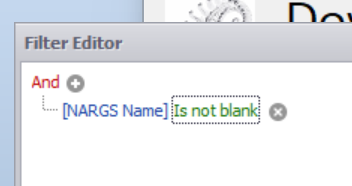
However the following is displayed on my form which I don’t want to see

Is there a way to set the record picker to display non-blanks without the above line appearing on the form?
0
-
Try adjusting the filter to “Is Not Null”
0

Please sign in to leave a comment.
Comments
1 comment