Printing Embedded Data values with Integration

I have implemented a Bartender Integration which detects new BTXML files written in a specific folder. The responsible of writing a BTXML file is a custom app; the user solicits the label of an item, and the app generates de BTXML file dynamically by listing its attributes in the NamedSubstring tags. Nothing wrong at this point, everything work accordingly.
The issue is that some items use the same BTW design despite having different attributes. Hence, an items BTXML file might not contain all the Named Data Sources listed in the BTW design. The expected behaviour was that those Named Data Sources would be omitted (or printed as a empty string), but instead it prints the Embedded Data set in the Bartender Designer app.
I've found work-arounds, but they do not apply for my use cases:
- Create a “non-dynamic” BTXML with NamedSubstring tags containing empty strings on missing data: There are a lot of different attributes and listing them off would increase the file size by a lot.
- Empty the Named Data Sources in the BTW design: I want the team to able to see the default values in Bartender Designer in order to understand every objects “logic”.
- Create a different BTW design with less Named Data Sources: this would be a monumental task, as there are a lot of different types of items, and different variations of the same item.
Is there any way of emptying these Named Data Sources by adding some sort of configuration to the Integration, BTXML file or BTW design?
(english is not my first language, excuse me for the mistakes that his post may contain)
-
It sounds to me like BarTender is doing exactly what you have told it to do. As the Named fields are not empty on the label and you are not sending a revised value to them, then it is printing them with the default value as embedded data.
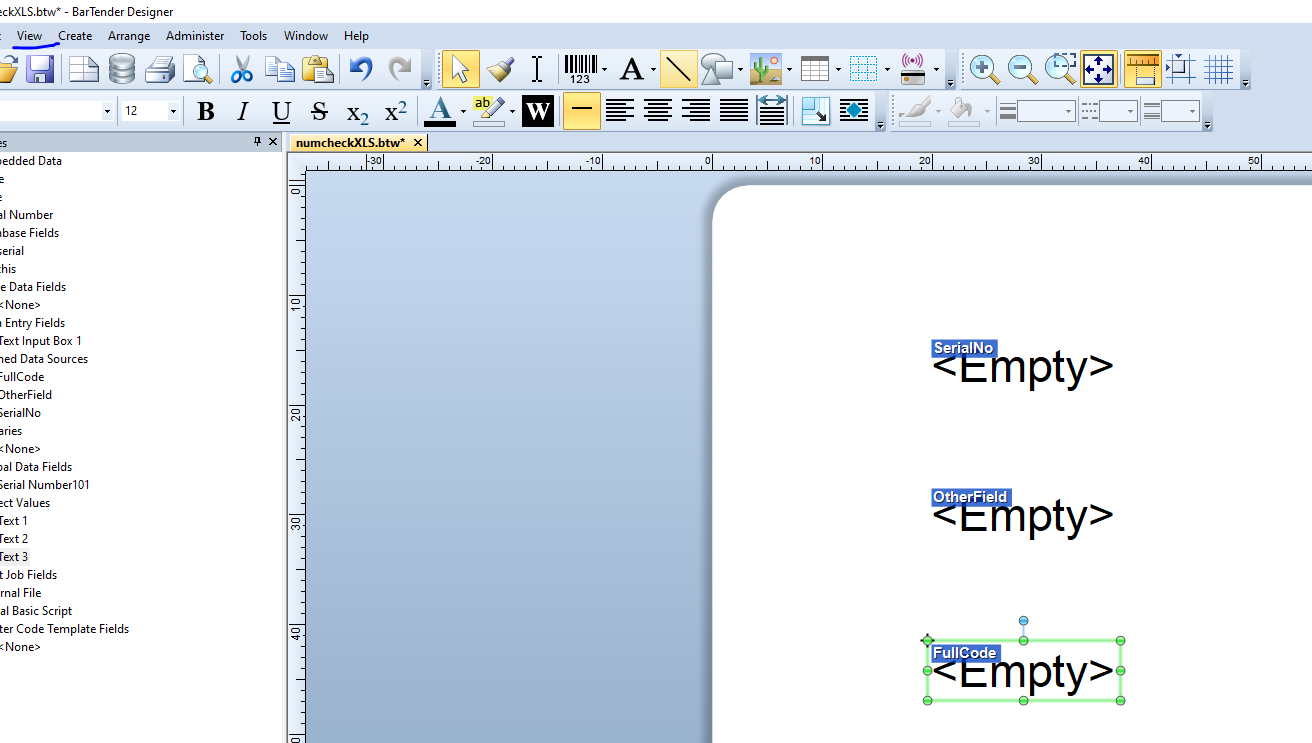
Your first option outlined above would get round this or as alternative you could use the 2nd option. For this I would suggest emptying the fields of the default values but from the View menu enabled the Named Source Names option (or hit F12 to do this) and the users will be able to see this when they open the label in Designer
 0
0

Please sign in to leave a comment.
Comments
1 comment