Open Type fonts in Print to File

H BarTender community,
I am working on a label that requires Arial and Arial Bold font. I have the fonts installed on the label printer as well as the driver installed via Zebra Windows Printer Drivers by Seagull. I have designed my label using the Arial or Arial Bold font for all text fields. I select the printer from the dropdown and select Print to File. The file that generates contains all of the label contents as a DGR Object. Here is a screenshot of the file: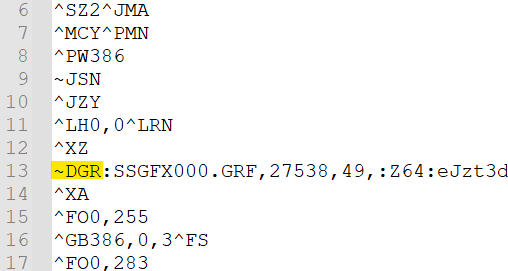
I need to be able to change some of the ^FD fields to specific text that represents variables the PRN file will be called. However, with the contents of the file basically as an object, I am not able to modify the field values. Anyone else come across this issue or have a solution to get the ZPL code better defined?
-
At the moment you are sending down data referencing a true type font and so these fields are being sent to the printer as graphical strings. To be able to reference them in the way you require you will have to download the fonts to the printer first and these will then be given.
Whenever you use the driver that "knows" these fonts have been downloaded then any data strings will be sent to the printer in ZPL format including the command to tell the printer what font reference to use for the Arial and Arial Bold. You will then be able to modify the PRN so you can use the ^FN/^FD command or however you are printing the data.
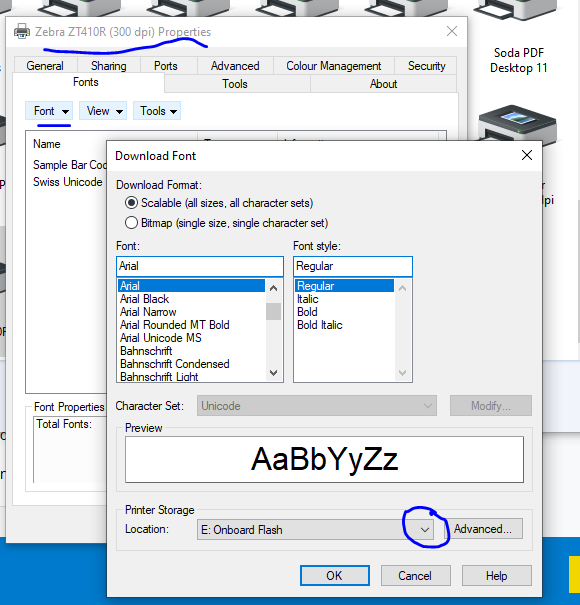
Please note if you are printing to multiple devices you will have to install the fonts in the same order to each printer so that they store the fonts with the same number. To download the fonts via the driver you need to go into the Printer Properties and select the download option from the Font tab. Make sure you are saving the fonts to none volatile memory.
 1
1

Please sign in to leave a comment.
Comments
1 comment