radio button to control to different fields

Hi guys
I have label with controlled by a database, but i am trying to have a manual overide of radio buttons two control two fileds of the database i can achived this having to lots of radio buttons but is there to combine into one ??
example current i have two radio box this might cause if one box is check company 1 and other box checked company 2
company1 = logopicture1.png
company2 = logopicture2.png
linked the data logo picture
company1 = textwebsite1
company2 = textwebsite2
linked data website
so need a controlled
company 1 = picture_field and webstie_field
company 2 =picture_field and webstie_field
and ideas any one
-
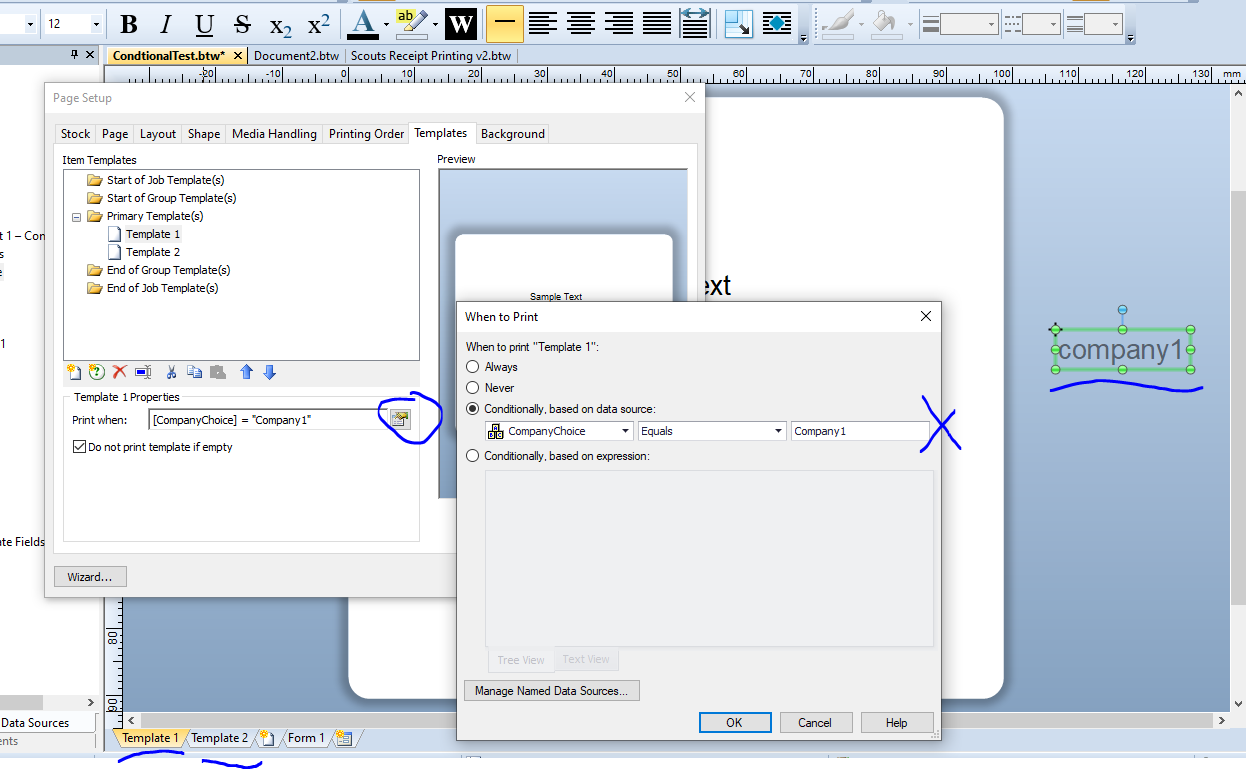
Conditional Printing maybe the simplest way to achieve this:
Create two almost identical templates and on the first add the fields that link to logopicture1.png and textwebsite1 whilst the 2nd template links to the other pair.
Add to your first template a text field off the side of the label and use the Change Data Source Name button into the Properties of that field to give it a name. I called mine CompanyChoice in the sample below. On your Data Entry Form, link the Radio Button list to this Named Data Source.
For each template click on the Properties of the Template tab and click on the Print When button to set up Conditional printer for each in turn similar to the screenshot below
I hope this helps
 0
0

Please sign in to leave a comment.
Comments
1 comment