Printer Orientation Issue

I'm having an issue where I can't get a label to orient the right way when using the Integration Builder. The label prints perfectly through the Automation Builder designer, but when I print the labels using the Integration the orientation is rotated 90 degrees.
I've used the system successfully to deploy a set of labels to a different printer (both printers are Sato M-84s). Those labels are 3x4 and print correctly. Now I'm trying to make 4x6 labels and when I test via Integration Builder they almost seem to have the same orientation as the smaller labels.
I have tried playing with printer settings both in and out of Bartender, but I still can't get it to cooperate. What am I missing..?
-
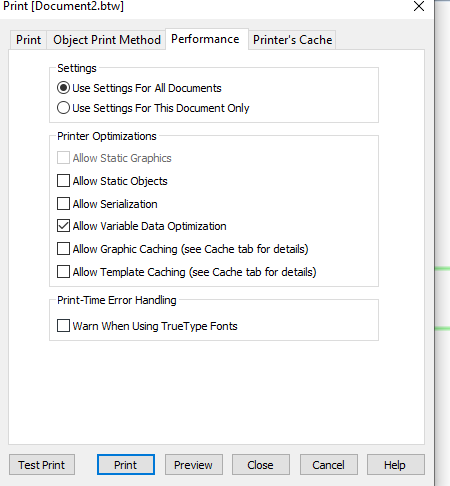
You could try turning of the caching options so that the label format will be removed after printing. Open the labels up in Designer and go to the Performance tab in the File>Print screen. Untick the various options and then Close that screen and save the labels afterwards.
 0
0

Please sign in to leave a comment.
Comments
1 comment