How to add alphabet to barcode

I'm creating one text field with an object name "K" & one barcode object in my template. The barcode object will link to "K" data source.
How to add 1 alphabet in barcode object? I don't want the alphabet display in text field
Example: Text object data: 0101-20778
Barcode Object: P0101-20778
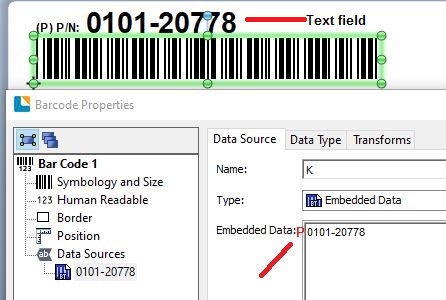
Thanks in advance.
-
Currently, I'm using Bartender Ultralite version.
0 -
Hi Nicholas,
I haven't got access to the Ultralite version but I know a number of the standard features are not available in this so you may have to add the fields as separate items.
Below is a sample of an Odette label that can be used with a full version and I am not sure if you can replicate this.
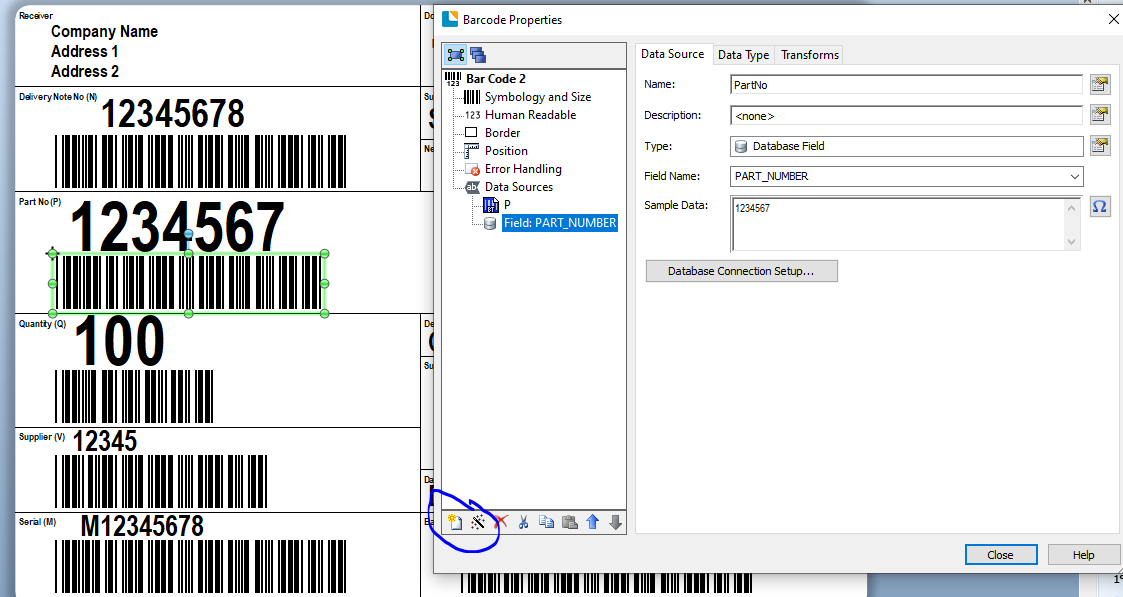
The P in the barcode has been set as a separate Data Source via the use of the highlighted New Data Source button. The data part has been given a Name PartNo in this sample rather than the K you are using and so that means that element of the field can be referenced independently of the prefix.
I hope this helps
0 -
Thanks for your response Pete Thane.
I found it.
0

Please sign in to leave a comment.
Comments
3 comments