link multi dropdown list to on barcode

In the data entry form, I want to link multiple dropdown lists to one barcode. But, in the "linked data source" option, it only allows one dropdown list to link to one barcode.
-
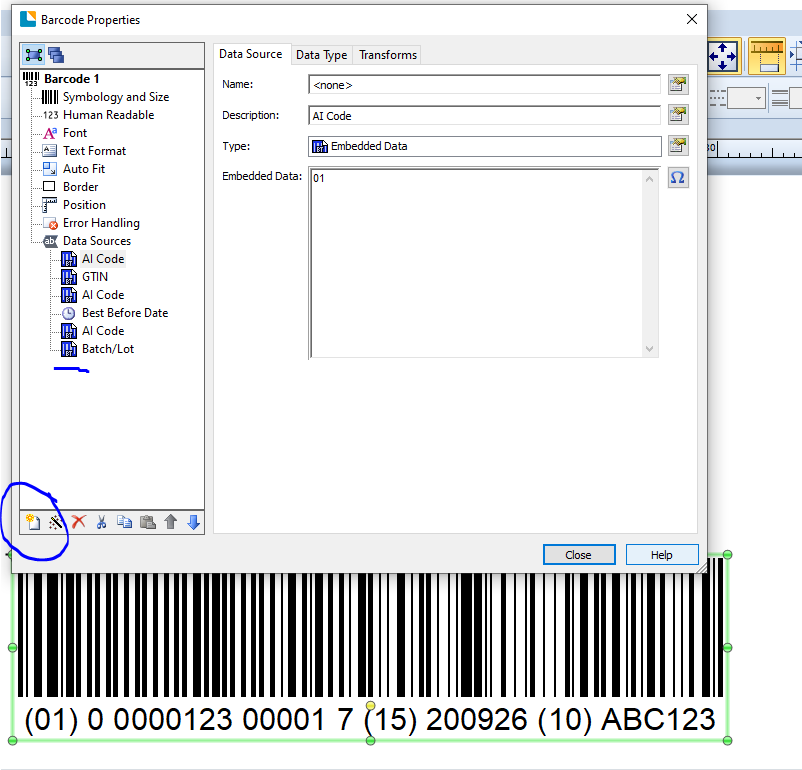
Unless you use Visual Basic you can only link one sub-string on a label to one source, however barcode and text objects can be made up of multiple sub-strings and each of these can have a different source of the data. In the image below is of a GS1-128 barcode made up of a number of fixed elements (the application iidentifiers) and a number of other data strings. Most of these are basic text strings but you will notice in the list on the left that the Best Before Date is a clock field.
There is a wizard to help create GS1-128 barcodes like these but for other barcode and text fields you can add new sub-strings by using the New Data Source button than I have ringed on the image.
I hope this helps.
 0
0 -
Hi Pete
Thank you so much for the instruction. It is very useful. Could you explain how to use VB to implement the multiple dropdown list on a label? Because it is convenient for our operator and reduces the mistake they could make. I appreciate.
Best,
Naibin
0 -
Hi, Pete
One more question is how to display the 'display text' of dropdown list in a text around the barcode, because the display text shows the full information of the value part of dropdown list. Thanks
0

Please sign in to leave a comment.
Comments
3 comments