Field position dependent of other field content

Is there a way to have for example four fields (filled by a VB.NET program) below each other and make the position of the second, third and fourth field dependent of the size of the first field?
-
Is this the kind of thing you are looking for?
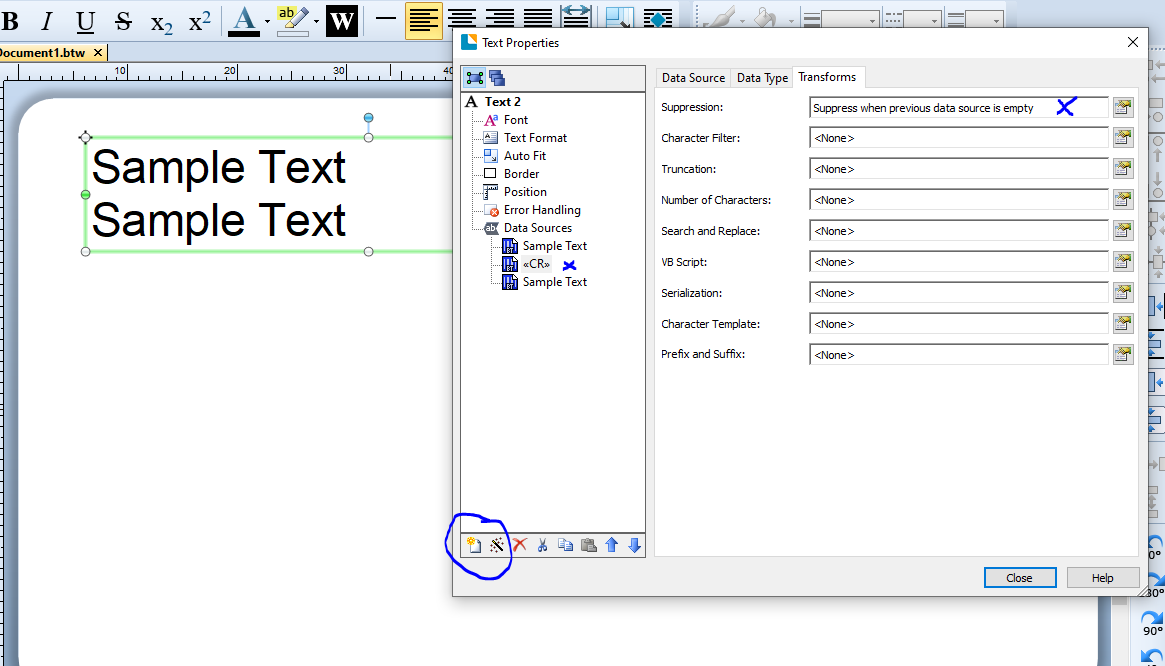
Set each field as a separate sub-string within a Normal Wrapped text field. All the three fields shown in my sample below are embedded strings but these can all have different data source types as required.
You could add a Suffix <CR> to each of the first 3 lines although in the image below I have set the <CR> as a separate string and then included the conditional printing option as shown so if field 1 is empty field 2 would move to the top of the paragraph.
 0
0 -
That could be a solution, but I want to add several RTF fields with a fixed line in between the fields.
In the meantime, I played around with document scripts in BarTender. I'm using the OnNewRecord event, that seems to work in BarTender.
Format.NamedSubstrings("BTVarH").value=Format.Objects("BTT1").Height
Format.NamedSubstrings("BTVarPos").value=Format.Objects("BTT1").Yformat.objects("BTT2").Y = Format.Objects("BTT1").Y + Format.Objects("BTT1").Height + 0.25
msgbox(Format.Objects("BTT1").Y & " " & Format.Objects("BTT1").Height & " " & format.objects("BTT2").Y)But if I fill the fields from VB.NET and print the doc, the script isn't triggered. Is there a way to trigger the script (anywhere) from the VB.NET program?
0 -
I have not had a need to work a lot with RTF fields to be honest and normally just use normal text fields but I am not sure you can address RTF fields like that in BarTender itself whilst normal text fields you can
0

Please sign in to leave a comment.
Comments
3 comments