How to print ^ character in barcode

I have to generate barcode label. I prepared an excel sheet with data. That data is PX1888823^1LFG^21LA12^1LRIP
After linking this excel as data source and generating labels using this above data ^ is removed from the barcode by bartender, why ? How can I fix bartender so that it will make barcode containing ^ character ?
Thanks,
Ajit.
-
For some specific barcode symbologies (eg. Data Matrix barcode), the "^" is a reserved character for encoding non-printable characters such as escape sequences and functions. In order to encode a literal "^" character, you will need to use two consecutive carets ^^ to escape it.
0 -
Are you using Code 128? If so the ^1 and ^2 will be picked up by the symbol as if they are function 1 and function 2 characters.
If you use a different barcode symbology, such as Code 39 Full ASCII then they will appear.
0 -
Thank you Jasper Wen !
We are using Code 128. So, should I use two consecutive carets ^^ in case of Code128 symbology ?
0 -
Hello Experts,
Please help me how can I barcode the below string using bartender software in Code 128 symbology ? Bartender is removing ^ caret character from the barcode when the below string is passed to generate the barcode.
I am passing this : PX1888823^1LFG^21LA12^1LRIP
and bartender give the barcode : PX18888231LFG21LA121LRIP
It is removing ^ caret character . How will I force bartender not to remove ^ caret character from the passed string ?
Thanks,
Ajit
0 -
As Jasper's suggestions works I assume you are trying to work out how to implement the change in the label as I assume you cannot change the original data that is being passed into the barcode.
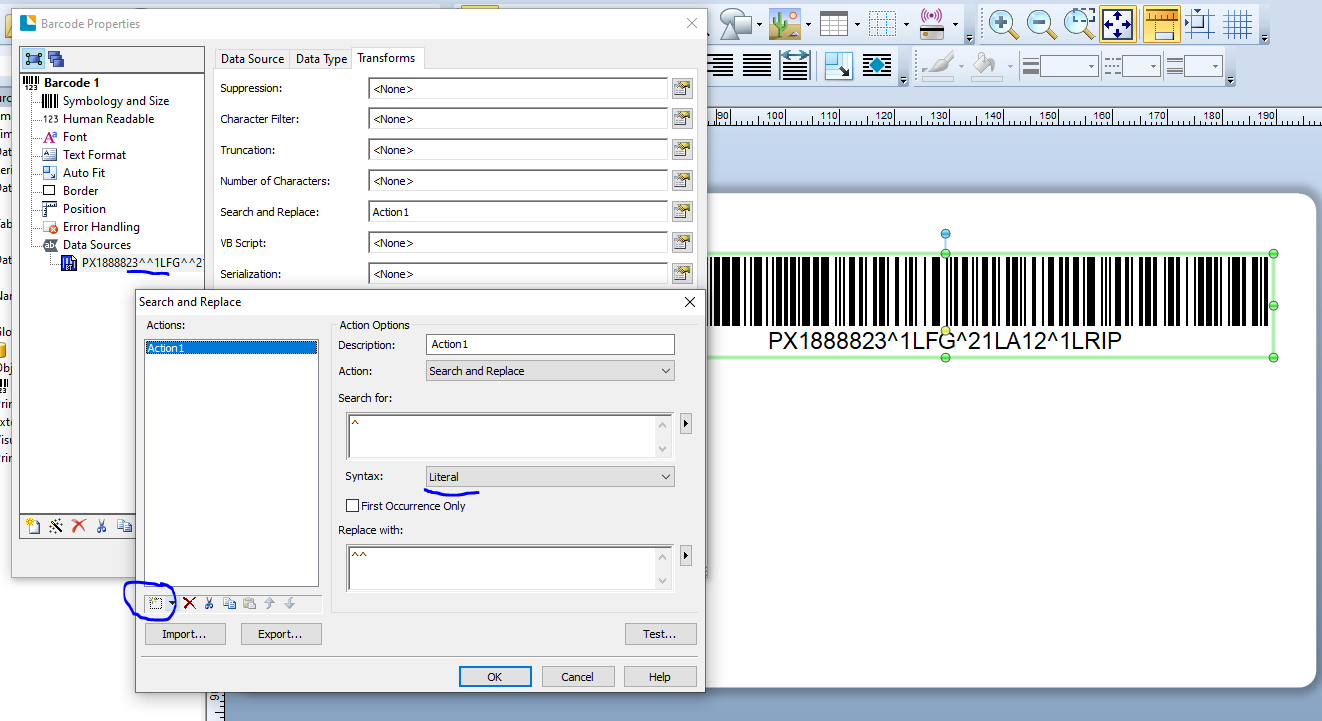
I used the Search and Replace feature on the Transforms tab but had to adjust the Syntax setting to "Literal" and as per the image below you can see the settings I used, the amended data string (on the left) and the barcode in the background
 0
0


Please sign in to leave a comment.
Comments
5 comments