Update data source after printing BT 2019

I figured out how to add a prompt- why it's no longer one click, I don't know- but I cannot find how to update the data source after printing. It does not ask me to save changes, just closes.
Thanks for any help!
-
I am guessing this is the option you are looking for
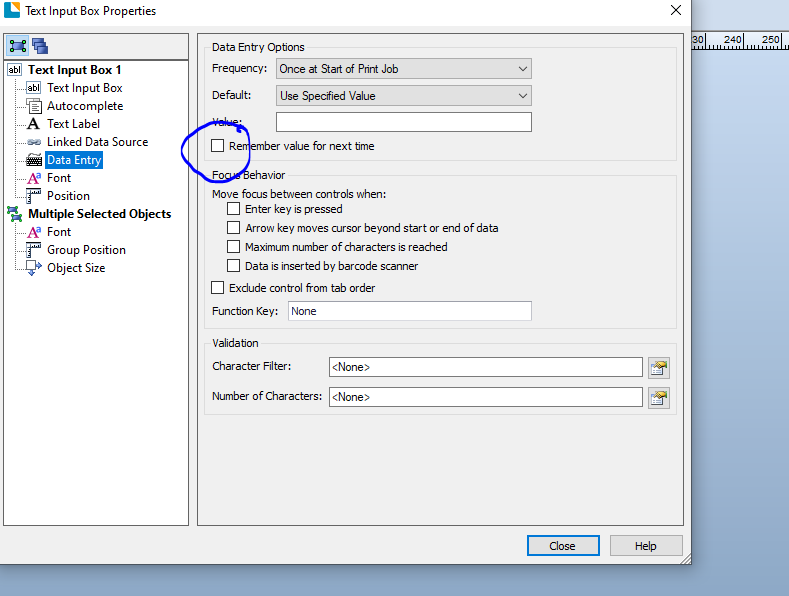
There are considerably more options and things you can do with the print time prompts are handled in 2019 as opposed to some of the somewhat earlier versions which is why the old options from the Transforms tab is no longer there. Took me a while to get used to it but after using it for a while and some of the other features I find it works really well.
0 -
Hi,
I do have that box checked on the label but I am not asked to save changes after printing and the prompts do not update.
0 -
If you have that option enabled it should save it automatically and so when you reopen the label it will have the retain the last entered information as the default data in the prompt entry box . That is how my copy works.
2019 seems to me to be a lot more permissions heavy and if you are having a problem with your label you may want to check the permissions for the folder you are trying to save it to.
0 -
Hi Colleen, thank you for your post!
As Pete mentioned, if you enabled Remember value for next time in your Text Input box object, the label should automatically update the data source without asking to save; aside from saving your label, you shouldn't have to do more than that.
If you're experiencing a bug or an issue, consider opening a case with Technical Support here.
Thanks!
0


Please sign in to leave a comment.
Comments
4 comments