Serialization

I wan't to print serial numbers. but i want the source to don't change.
EX: SERIAL No. 01. , I print 2 serial numbers . and the source now change to 03.
I want to stay 01.
Even if i print multiple serial numbers.
-
If my understanding is correct you want the serial number to start at 01 for every batch of labels. If this is the cose you need to agjust the Reset settings. These can be found in the Properties of the number field on the Transforms Tab and the Serialisation option as per the image below
 0
0 -
If I give print 20 copies it should print like 1/20,2/20,3/20....20/20. Is that possible..?
1 -
Yes that is possible. You would need to make your field out of a couple of substrings, one that is set to serialise and reset as above, one with just a slash (/) or else make this a prefix or suffix of one of the strings around it and the other a text field that is linked to the number of serialised labels. I would suggest giving this final field a name for ease of reference.
This should then look something like this, other than for the final part

To link to the number of serial numbers value click on the button to the right of the entry box on File>Print screen and then set to get the Value from the Data Source and on the Data Source screen click on the Name button and select the name you entered above:
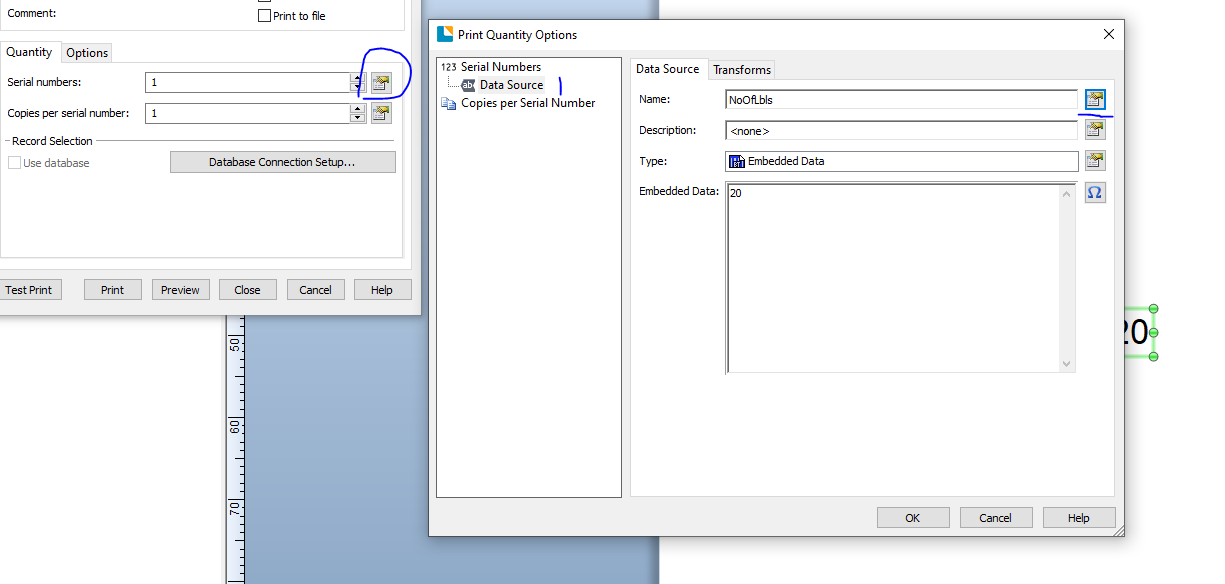 0
0


Please sign in to leave a comment.
Comments
3 comments