Database Setup CSV file, first "three" rows is a header

I am setting up my connection properties using the database setup wizard for my comma separated text file. When I get to the Field Names section and it gives me the option to select 'The first row is a header containing field names', how do I specify that the first THREE rows are header containing field names? What is happening if I only specify the first row, then the other two rows will print blank label data until it reaches the fourth row.
-
You cant is the simple answer.
If the 2nd and 2rd rows are empty/blank then they wont print.
0 -
Just a thought, you could add a filter in the database connection to get round this.
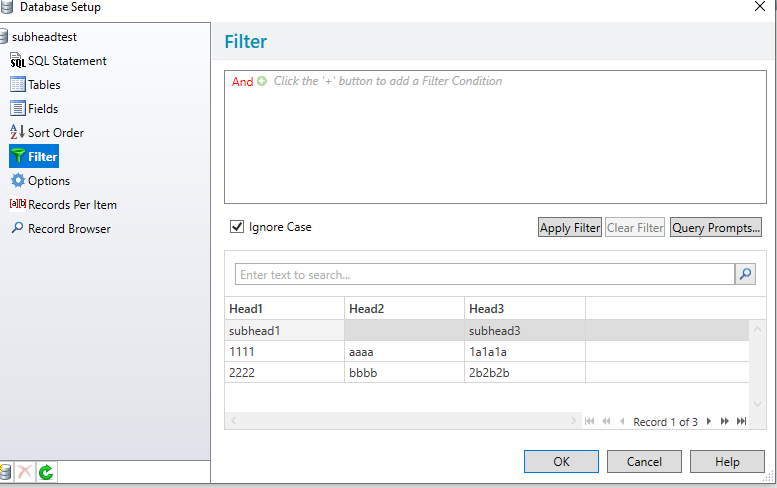
For example in the images below, I have linked the label to a file with three headers (Head1,Head2 and Head3) and a second line with 2 sub-headers, subhead1 and subhead3. This means that the 2nd line for "Head2" is empty as per the image below:
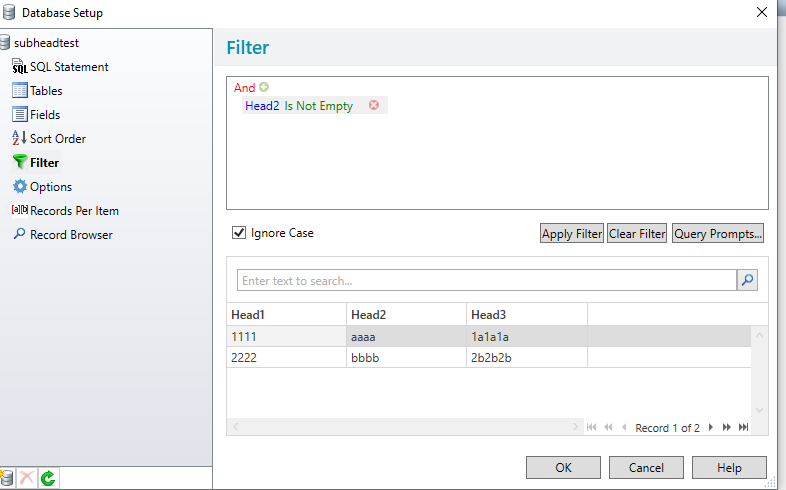
For this there are two option, I could include a filter that checks the line 2 of Head2 is empty (per the image below) or else I could have set the filter to Head1 does not equal "subhead"" so that that line no longer will print.
Hopefully this will help.
 0
0

Please sign in to leave a comment.
Comments
2 comments