Ascii Control Characters work on one computer, not on another

On our production orders, SAP renders a QR code with the following content:
- <Inventory ID>ASCII(13) ASCII (10)<Revision ID>ASCII(13) ASCII (10)<Work Order #>
This QR is scanned into the first field of a Bartender form, and the ascii characters cause the field focus to change, effectively populating three field with on scan.
On computer A (Bartender 10.1), this is working as usual.
On computer B (a new machine, Bartender 2019), the ascii have no effect, and the three content values are concatenated into the field.
What environment or resources might cause this behavior?
-
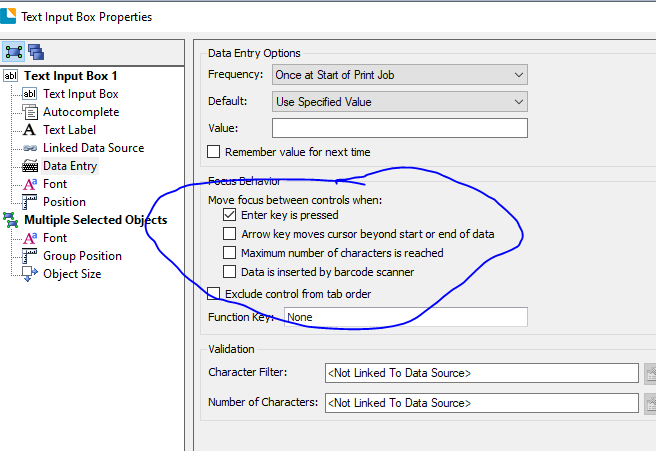
Cant test this but I am guessing it is due to one of the ringed settings below on the data entry screen properties in 2019, possibly the top one as you are using a Carriage Return/Line Feed or perhaps the Barcode scanner tick box at the bottom.
(Probably no use to you as yours is an existing application, but I normally use a TAB rather then a CR/LF when implementing similar systems)
 0
0 -
Pete, an excellent hypothesis. I tried every combinations of settings in the ringed Focus Behavior options, and saw behavior change accordingly (as when "maximum number" causes field advance) but nothing caused the ASCII(13) ASCII (10) to advance the field.
---------------------------------------------
Is it possible that 2019 R1 simply doesn't handle CR/LF ??
Experiments continue. Thoughts appreciated.
0 -
Just a thought, have you tried scanning your code into Notepad on the 2019 PC and does the PC/Scanner cause the CR/LF to trigger? As if that doesn't work then if the PC is not recognising the ASCII characters then it wouldn't in BarTender either
0

Please sign in to leave a comment.
Comments
3 comments