Integration Service Not Working on Windows Server 2019

Hello,
I recently installed BarTender 11.5 (NB I am not updating to 11.8, due to the changes made to the Print Portal) on Windows Server 2019.
The integration service is listed as running in the Administration Console but is also shows that the connection has been refused.
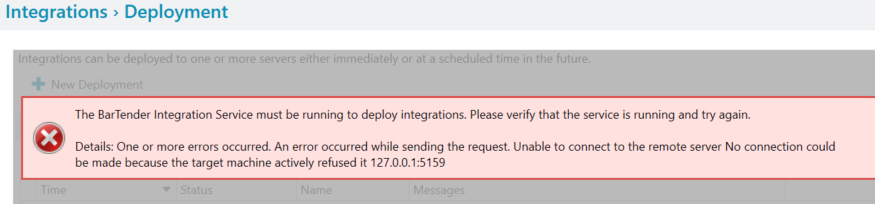
I have tried:
- Reinstalling the .net web hosting bundle as worked for another https://support.seagullsoftware.com/hc/en-us/community/posts/12607742543639/comments/12632924533143
- Updated the .net
- Checked that port 5159 was allowed by the Windows Firewall.
- Switched off the firewall for Domain, Private, and Public
- Used a local admin account for the Intergration service to log on with.
The same installation worked fine on another PC running just Windows 10 Pro.
Does anyone have any other suggestions to get Integrations working on sever 2019?
Thanks,
Paul
-
I wonder if it a permissions issue. By default the Integrations will run using the credentials of the “user account” that runs the BarTender Print Scheduler service and, unless that has been changed, it will be using the Local System Account as the “user”. Often that account does not have permissions to access network devices and locations and so you could try adjusting the setting to user and account that has full network rights and see what that does
0 -
Thanks for the suggestion, I have tried giving all BarTender services the log on for a local & domain admin account and restarted them but to no avail.
Not sure what else to try at this point, will contact support and see if there is any thing else that I can do.
0

Please sign in to leave a comment.
Comments
2 comments