Automated date based on list/table

Hi all,
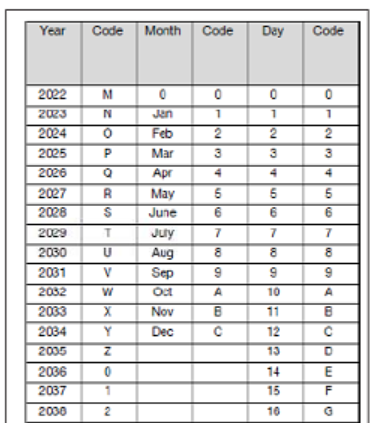
Can anyone help to guide me how do I set in bartender below date code and to tally/sync it based on desktop date/time? Please advise, thanks!
0
-
For the Year you could configure a VB Array and use the last two digits of the year (minus 24) to get the code letter, such as
Dim CD CD = Array("O","P","Q","R","S","T","U","V","W","X","Y","Z","1","2","4","4","5","6","7","8","9")
Value = Now()
Value = Year(Value)
Value = Right(Value,2)
Value = Value - 24
Value= CD(Value)
The Day could be calculated in a similar fashion but straight from Day value (ie no need for Right or -24), with a similar process for the Month (Value = Month(Value) )
0

Please sign in to leave a comment.
Comments
1 comment