Cannot edit SQL statement in template or integration

We have been using BarTender for years with an Integration that would monitor a table on a local SQL Server for information to print plant ID tags for our nursery. We have moved to a cloud-based ERP system and that software is dropping a CSV file into a folder on our local network which I plan to have BarTender monitor. The CSV files contain the data to be printed on the tags, the number of each tag to be printed, and the printer to send the job to.
I have constructed the Tag template to use the CSV data on the tag and that works great. Now I am trying to work with the data so that the integration can assign the quantity to print and the destination printer and I am having an issue. The CSV contains an Integer code to determine which of 3 identical printers to print to - 1 for Office, 2 for Warehouse and 3 for Shipping. I had thought that I could edit the SQL statement in the Database connection on the tag template to substitute the printer name for the Integer, but the SQL statement is grayed out and I do not see a checkbox to allow for edits. My next thought was to do it through the integration itself, but I've tried transforming the text to a recordset but do not see how I can make the substitution there. I feel like there should be a way to do this, but the solution is evading me. Any suggestions? Thank you!
-
In the Integration set the printer name as a variable linked to the field in the trigger file and adjust the printer names to match this setting
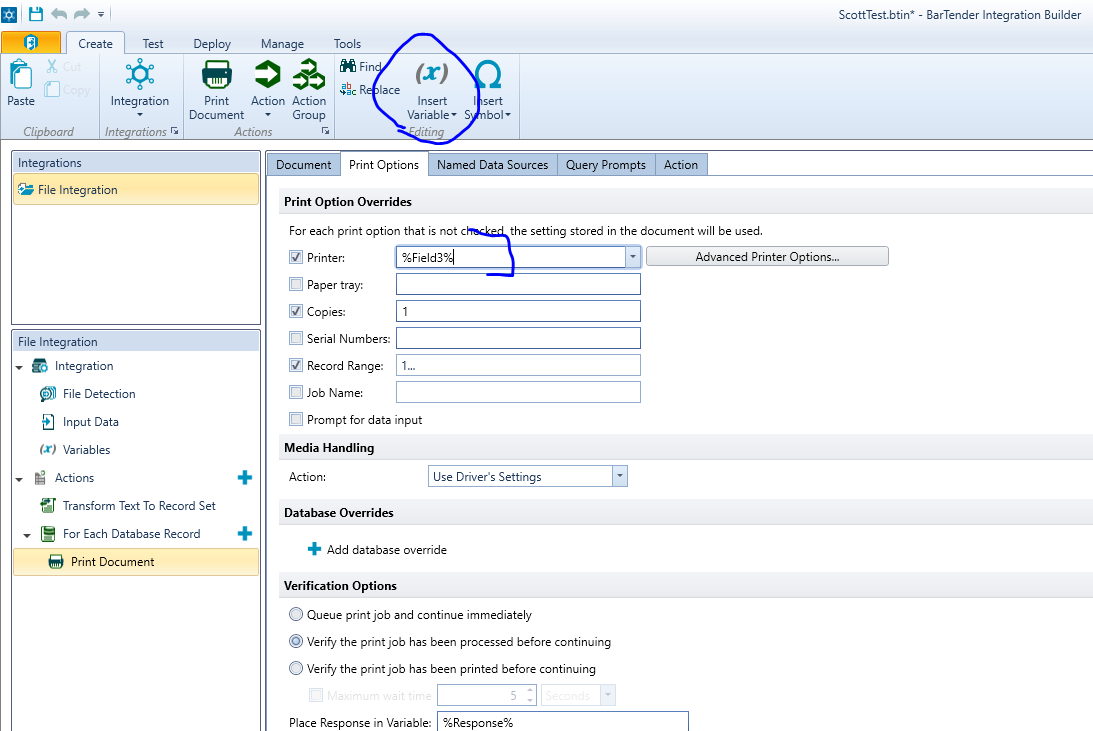 0
0 -
Just to update - Support steered me to the Select Case action within the integration. I had completely missed that it was an option. That seems to have solved my problem. Thanks to everyone!
0

Please sign in to leave a comment.
Comments
2 comments