Space between labels

Hi,
I´m new working with Bartender.
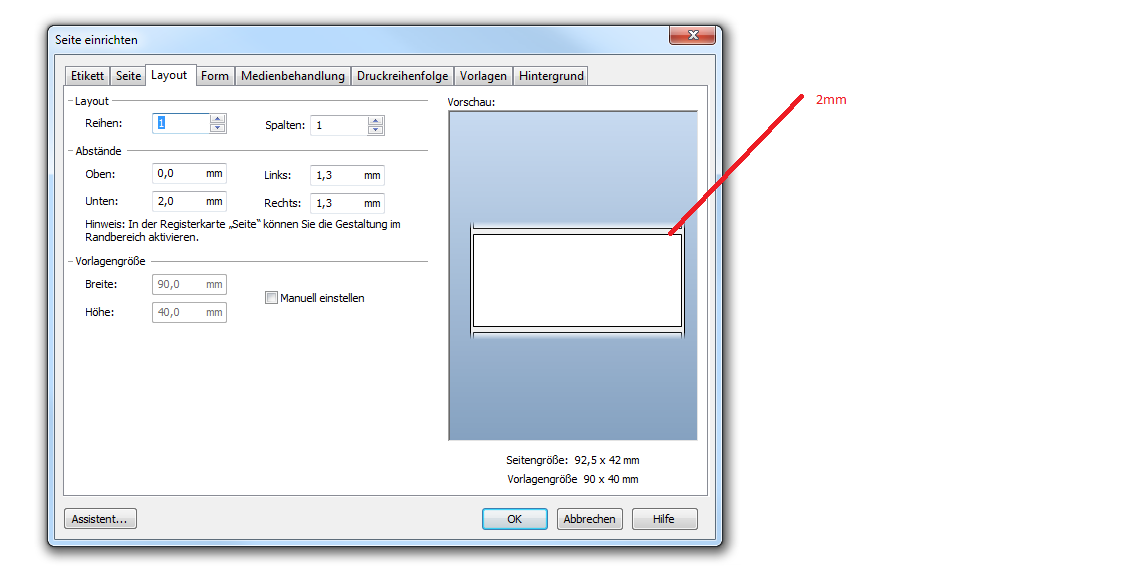
I´ve got the problem that the space between the labels is incorrect.
The lables size is 90mm x 40mm. There is a space about 2mm between the lables.
But I´dont know where i can save this setting.
0
-

Shotaro Ito
★ BarTender Hero ★
Hi Alexander,
For label printers, in layout tab, set top and bottom margin as 0.
For printer driver created by Seagull, In print dialog > document property, in stock tab etc you may find 'label gap' to specify the gap.
For some printers such as Zebra ZPL models, actual label length and gap needed to be detected by printer.
such as Printer properties > tools > Actions, apply calibration or detect label length.
1
Please sign in to leave a comment.
Comments
1 comment