Unprintable Region

How can i remove the unprintable region on the label design so i can print right to the edge on the labels?
Im using a Swiftcolour printer which prints to all edges using other
software but for some reason with Bartender i always get a small margin
on the top and left sides of the label.
Is there a way i can make it print to all edges? Thanks
-
In BarTender you'd set zero margins in the page setup. Then the rest is down to the setting you make in the printer driver. Do this via the Print dialog and then the "Document Properties" button as this is where you set the printing preferences of the particular document. I don't have the printer or driver to test with, but this is what you'd need to do.
0 -
Having some weirdness with this too. I've had custom perforated paper made (poorly), and it's 8.5x5.5, so I can insert it edgewise into my laser. Is the print preview supposed to show the 1/4" unprintable margin? Mine shows this zone, even though I've set zero margin on the left and small on on the right.
Even with a full 8.5x11, it still blows out this margin zone extending into my lable zone. Ideas?
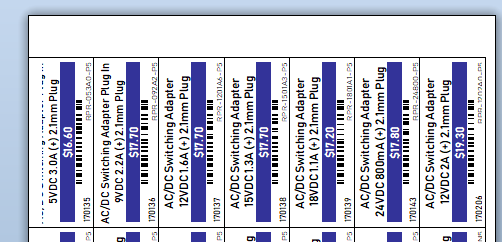
I'm trying to locate the driver margin settings mentioned here, but to no avail either..:
https://support.seagullscientific.com/hc/en-us/community/posts/216568807/comments/2219657270 -
Dave H: The unprintable area is the zone on that page that the printer is physically unable to print onto. This area is reported to BarTender via the printer driver. You'll find that most office printers are unable to print to the edge of a full size page.
However, one thing you can try is: select the "Administrator>Advanced printer and driver setup" menu item. Choose the printer in question and enable the "Override default settings" checkbox, and then tick the "Ignore page size limits reported by driver". You can the try to print to the limits you want, but at some point you'll hit the limits of the actual physical printer.
0


Please sign in to leave a comment.
Comments
3 comments