Setting Column Width To A Fixed Size

Hi all, can someone help me out, when printing from a database, the column width shown in the attachment should be set to a smaller size. We do not want to change the column width each time printing. Perhaps a setting in the program or dll file should fix the problem for us.
-
Nobody got a clue to solve this?
0 -
From the Print dialog, click the "Select Records" button, adjust the columns as wanted, then close and save the label.
0 -
Hi Ian, this does not work. After adjusting the columns then printing i save the document. Then i open the file again and the colums are back to the basic widths. Any other idea?
0 -
Check the file date/time stamp, and the instructions I gave you, as that does work (normally). Did you specifically click the "Select Records" button in the "Print" dialog, or did you do something else?
0 -
Does this feature still work? My bartender document fails to remember the column widths when clicking "Select Records".
I tried to do it in the order below and then saving the document.
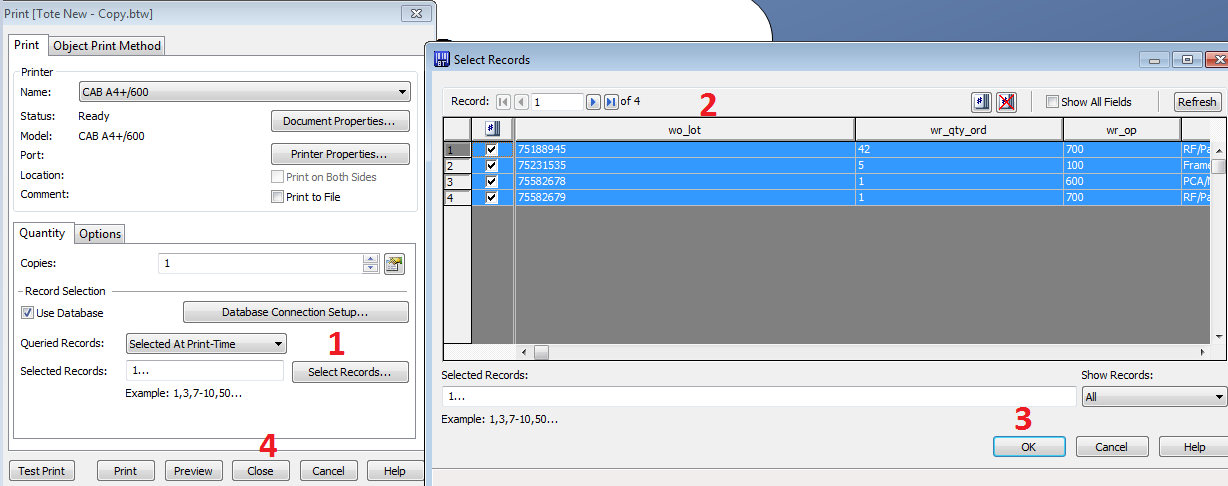 0
0


Please sign in to leave a comment.
Comments
5 comments