Data Entry Form Character Pad

Hi,
the Data Source linked to a Data Entry Control is numbers only. Naturally I choose Number Input Box for the Data Entry Control.
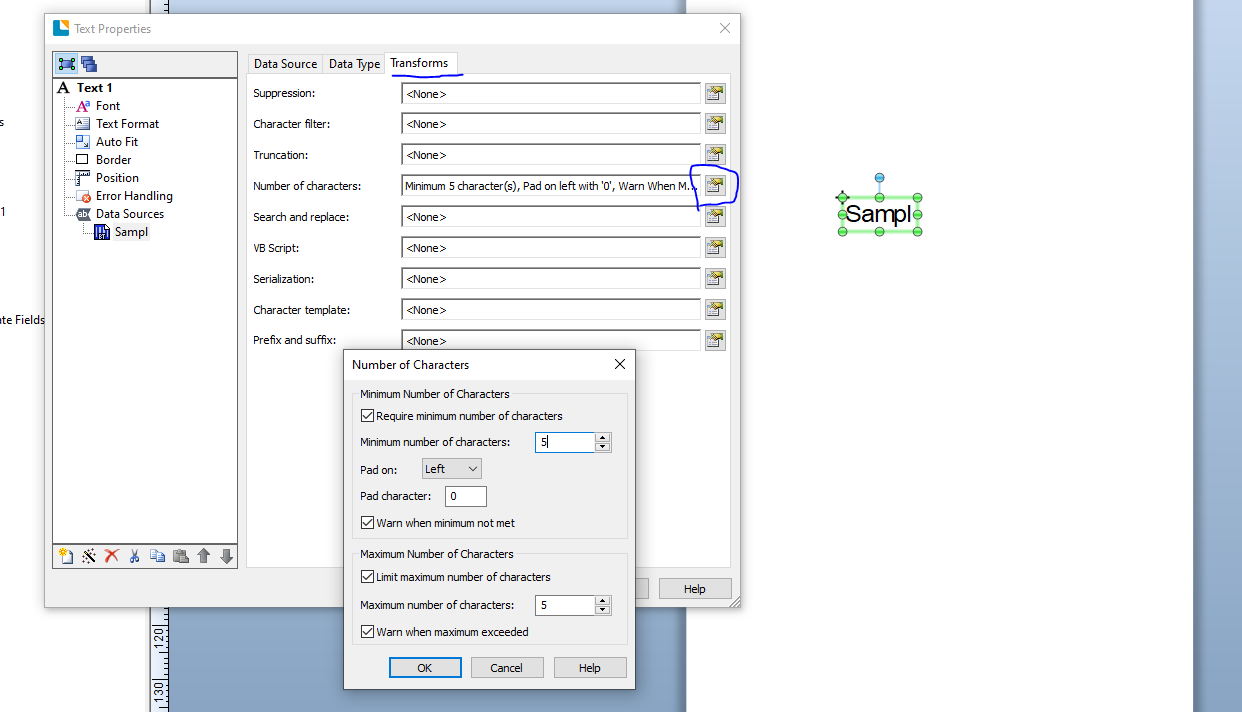
However, I would like to have validation where the printout will have exactly 5 digits. When user input "2", it would add padding of '0000' and convert to 00002.
I have read the help section, that validation belongs to the Character Filter which is only available with the Dropdown List.
The Number Input Box data control does not contain any sort of validation.
Or am I missing something? I am using Bartender 2022.
Thank you.
0
-
You need to configure the number of characters setting in the label field itself and not on the Data Entry form
 0
0

Please sign in to leave a comment.
Comments
1 comment