Moving from 30-day trial to Automation edition - cannot print (error 3418)

Hello,
We have been using a 30 days trial of the latest version of bartender.
I had 3 printers installed (and only had printed on those), and now have 2 more (5 total).
I purchased an automation edition, and activated the software correctly.
However, I now cannot print. It throws up error 3418 which essentially says the activation key is no longer valid. I can see both keys on the the licencing tab - the 30-days trial one is now expired, but our full automation one is present and correct.
How do I go about moving all five printers to the new licence? I tried setting up a template for one of the new printers as a test but it still threw up the same error.
I need a very simple, step by step process if possible!
Many thanks,
Nick
-
And just to say, I have looked at printer pools, etc but am baffled about it. I am not sure if the solution lies there or not.
0 -
Hi Nicholas, thanks for reaching out!
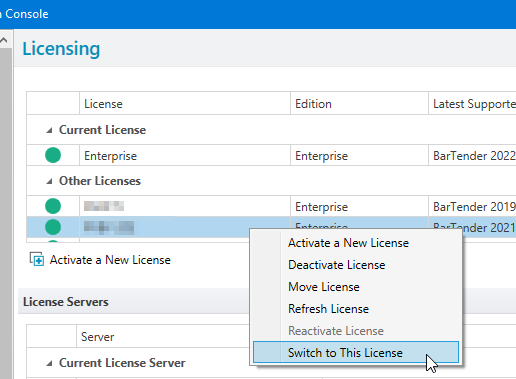
You may have activated the product Key code, but it may be necessary for you to switch to that license in order to use the license. Just so you know, activating the product Key code won't activate the printer count on the Trial key (it doesn't work like that).
Try to follow these steps:
- Open the Administration Console app and navigate to the Licensing properties.
- Allow the list of Licenses to populate; when the data loads, right-click on the License you want to use and click on Switch to this License:
- Try to print again in BarTender Designer.
If you're still having problems, please consider opening a case with Technical Support here.
0

Please sign in to leave a comment.
Comments
2 comments