Human Readable Data

How do I set the Human Readable Data only to display the data and not the prefix in the data.
-
Hi Chris, thanks for your post. It sounds to me like you've got a single data source in your barcode object that is using a Prefix transform. If this is the case, you're better off using additional data sources to create a prefix, instead of using the prefix transform. Here's an image to show you what I mean:

In the example above, you can see in (1) that we only have a single data source; the data source itself only has the data of "1999" but we have a transform-type prefix (set as "PREFIX-" for ease of recognition). This is probably what you have set up. Instead, do the following:
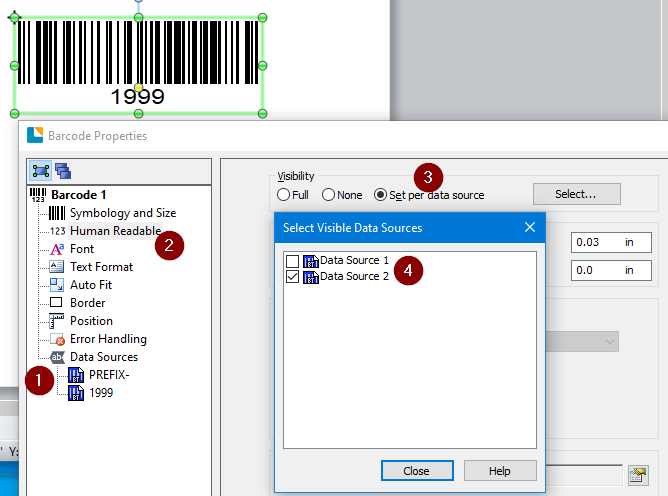
- Delete the prefix in the transform; then, add a new data source with the prefix data instead.
- Go to the Human Readable properties...
- ... and set the Visibility to Set per data source. Click on Select and...
- ... deselect Data Source 1 (if you've moved the data source to the top of the list, which you would if it serves to act as a prefix).
You'll note that the barcode object (in the image) is no longer displaying the prefix, though it is part of the data if it were to be scanned.
I hope that helps!
0

Please sign in to leave a comment.
Comments
1 comment