Design and Print differant

Hi All
The top picture is how it looks in bartender, the bottom picture is how it prints out.
What am i doing wrong here?
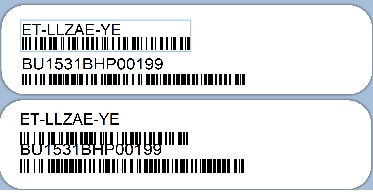
-
Hello Glen,
Apologies for the late response.
I presume the issue happens when printing to PDF, correct? Also, in order to properly troubleshoot this issue, we would appreciate it if you could share with us what BarTender version, edition, and service release are you currently using. You can find this information by navigating to the "Help > About" tab on BarTender Designer's upper menu.
Thank you.0 -
Hi
Program: BarTender Designer 2016 R8
License: Basic
Version: 11.0.8.3153 (64-bit)
OS: Windows 10 Pro x64 build 19045No this is just printng to a label with a zebra printer
i also have a similar issue with the text not being central vertically.
making a simple label with a number on it, the number get cuts off the bottom even though it central in bartender.
i tried calibrating and making sure the label is the correct size within the printer settings and bartender
0

Please sign in to leave a comment.
Comments
2 comments