Remove blank lines when a field is blank

I am new to Bartender. I am creating a label with multiple fields. If a field for a given data record is blank, I not only want to suppress that field, I want to move the other fields that are below the blank fields up so that there is not a blank line. I am hoping for a check box that will do this for me, but don't see one to do this. My internet search found a couple posts on how to do this. One includes something about creating a carriage return somewhere, but I don't understand it. I am handy with VB if there is a way to do it by VBscript.
If <Field1> is blank then
<Field2>.MoveUp one row
<Field3>.MoveUp one row
endif
or something like that.
-

Eric Myers
★ BarTender Hero ★
Hi Paul,
This works using a multi-line text object. Let's say you have four data sources and you want to suppress the second data source if it's empty. You will actually need to create seven total data sources. Three of the data sources will just be carriage returns. So it will look something like this:
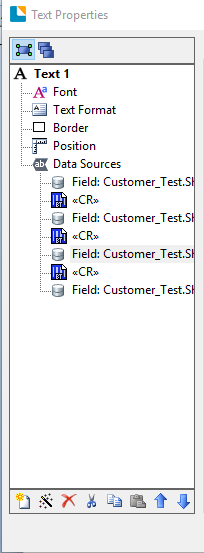
To suppress the second data source, choose the <CR> data source right after the second data source, then choose the transforms tab. Choose the button next to the "Suppression" transform. Select "Suppress when previous data source is empty"
This will cause the data source to not appear when the field is blank. This works great in address labels where you have an optional address field with an apartment number.
0 -
Thanks for the reply. I have a couple questions. First, it sounds like the way to get fields that can be automatically adjusted is to create one multi-line field, and insert multiple data sources into it, correct? Second, what code gives the carriage return? Is it embedded data, or a database database field, or something else?
Thanks.
0 -
I figured it out. You can close this one. Thanks.
0
Please sign in to leave a comment.
Comments
3 comments