minor changes in label template when changing printer

Hi there,
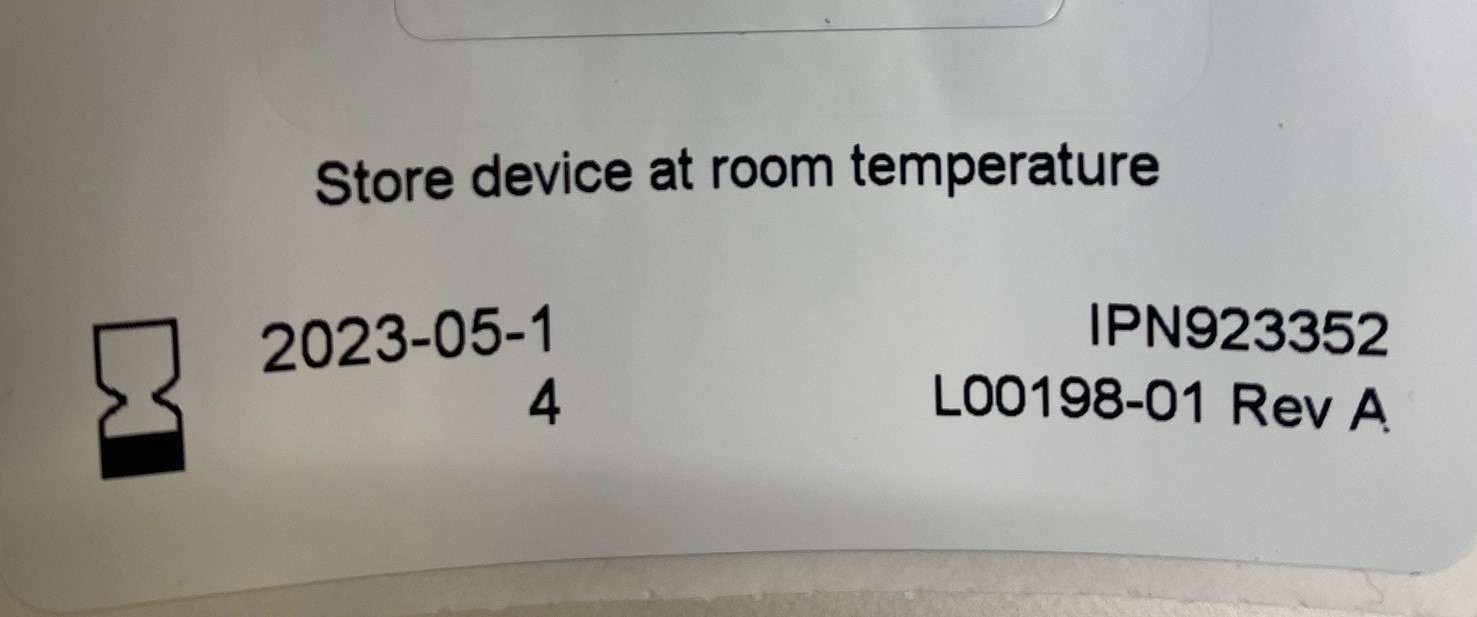
We were recently printing some labels through bartender. I have 2 printers connected to 1 PC and one printer has a 300 dpi print head, while the other has a 600 dpi print head. As I selected which printer to send the job to, I noticed that when I selected the 300 dpi printer, the label template slightly changed unexpectedly. See the attached image where the expiry date digit "4" spilled into the next line of the text box. When I changed it back to the 600 dpi printer, the template changed back so that the digit "4" was now correctly in the same line as all the other digits of the expiration date. Why would the label template change depending on which printer I select?? There is alot I don't know about the software, drivers, and hardware!!
-
Hi Dave,
Welcome to the BarTender Community Forum!
Printer with a higher DPI usually print objects smaller, while printers with lower DPI print slightly bigger objects on their labels. Since the printer with a lower DPI count prints bigger objects, this text box area containing the date might not be wide enough to contain its content, that is why it is printing the 4 below the expected work area. We could easily fix this by widening the text container in BarTender Designer. Could you give it a try?
Having said that, this could also be a driver issue, do both printers use the same driver package? Also, what printer models are you using?
Let us know how it went and feel free to reach us again!0 -
Try to do NORMAL TEXT instead of the wrapped text field and see if that stops it, since wrapped text fields are given boundaries on the left and right sides. This image shows us how the text reached the end and pushed a digit to the next line of text. This would not happen in normal text box that types in a straight line endlessly without carriage return happening for you, for a lack of better words.
Labels are mapped with dots which represent dots (like pixels on a TV screen) and the DPI conversions that are happening when switching from 300 to 600 may result in uneven math such as slightly different character widths or elongation/shortening of a text box field due to rounding downward or upward of the pixel value.
0


Bitte melden Sie sich an, um einen Kommentar zu hinterlassen.
Kommentare
2 Kommentare