Using network shares in root-folder not working

Hello.
I have now tested version 2022, and have problem with root-folders in print station.
Using Root-folder pointing to btw-files residing on a network drive, i get the wrong path when printing.
Real path: x:\company\department\labels\BT2022\my_lable_to_print.btw
Rootfolder: x:\company\department\labels\BT2022
Or use UNC: \\server\share\company\department\labels\BT2022
At Printing using X: i get: An error occurred while loading the document x:\company\department\labels\BT2022\labels\BT2022\my_lable_to_print.btw
The resulting path has repeated part of the path for some reason. But having the exact same path on c: works.
If i use UNC path, the path is matching the real path, but other-vice same error.
Any idea what's wrong?
-
Hello Lennart,
Thank you for reporting this issue in the Community Forums.
Our development team is currently treating this issue as a bug and is actively working toward resolving it. In the meantime, perhaps the following workaround might be of use to you or others with the same issue:- Elevate permissions to a domain user account directly in the Print Scheduler Service.
- Restart the BarTender System Service for the changes to take effect.
Once we have found a solution for this bug, it'll be implemented in future revisions of BarTender 2022. I will keep you posted with updates!
And again, thank you for reporting this issue!0 -
I also have a similar problem with Print Station 2022.
The root directory is set to "O:\Kanzlei\Etiketten". When selecting the label to print, I get the message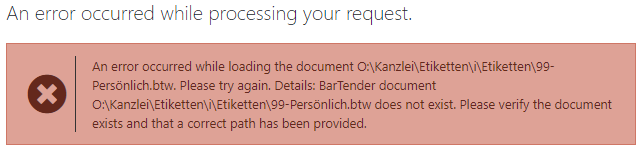
If I now use the UNC path instead, I get the following message
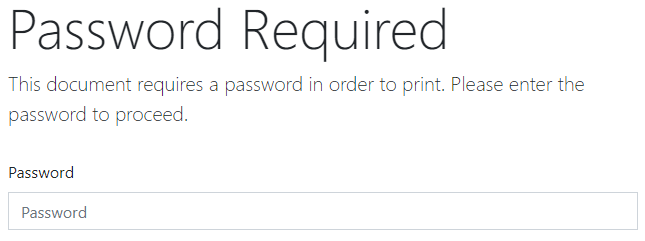
Of course there is no password set for the printout in the document. After entering the password, the printout takes place.
1 -
hello Bartender,
in the meantime R2 has been published. Unfortunately the problem with the network directories is still not solved. Am a little disappointed.0 -
I am receiving the same error message in Print Station as well. Do we know if it has been fixed in R5?
 0
0 -
Not sure , but there are a few references in the Release Notes for bug fixes/tweaks to do with network folders etc
0 -
Hi there,
Is there an update to this issue.?
Thank you.
0 -
We are still running 2021 R8 because of this. I have not tested any more lately, there is some newer patches, but I have not been told if it solves this problem.
0 -
Lennart Nilsson as a workaround, how did you guys able to redirect the file path?
0 -
In version 2021 R8 network still works, our attempts to upgrade to 2022 gave more problems for us, so we had to revert back to 2021. So the workaround is to downgrade.
0 -
I am testing on 2022 R8 on my DEV box. Stuck with error message :
Relative path '//servername/EpicorData/Bartender/Testing/' is rooted. Please specify the relative path without including a root.
Find this reported issues. I hope two years has elapsed, What is the current status.
How I can use UNC path? We must use UN, as we are dropping file .bt file on server other than bartender print server.
What is the solution? Please escalate.
0 -
We have not tested 2022 again since last time, and because of this we still run 2021 R8, the only resent version we have got running without problems.
0


Bitte melden Sie sich an, um einen Kommentar zu hinterlassen.
Kommentare
11 Kommentare