Human Readable Character Template

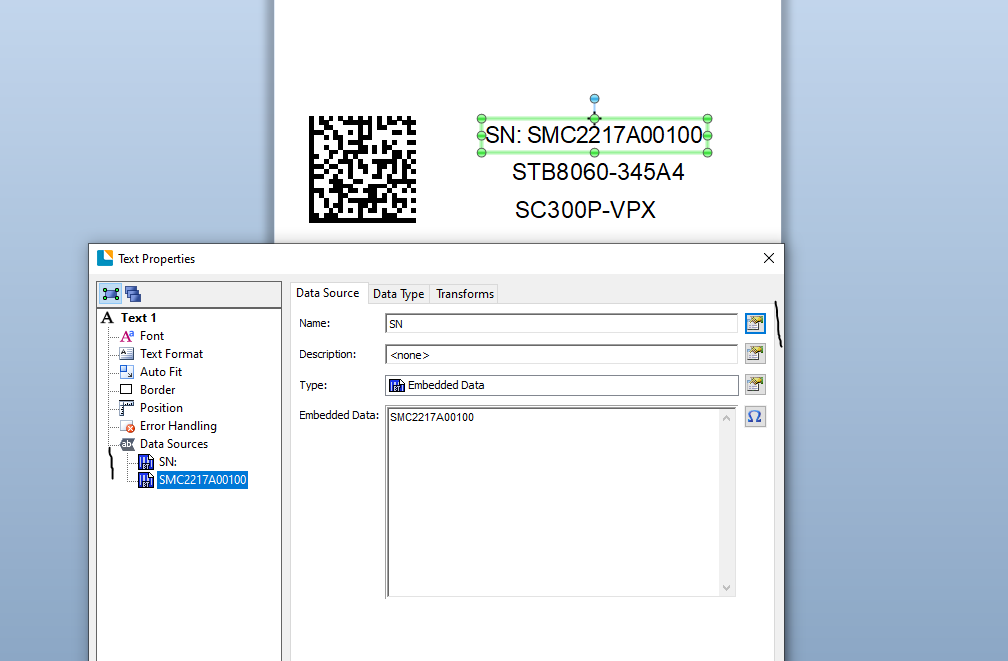
I have a label with a Data Matrix barcode ECC 200 as shown below. I would like to have the barcode data only contain/read the data below excluding the "SN: ", "Assy: ", and "Model: " and those to be human readable only. How can I do this?
SMC2217A00100
STB8060-345A4
SC300P-VPX
Under barcode properties/Human Readable/Human Readable Transforms/Character Template , I have "SN: " as the character template. There is another "Character Template" under the Transforms tab of Data Sources, but that will add the string to the barcode as shown below:
SMC2217A00100
Assy: STB8060-345A4
Model: SC300P-VPX
Using Bartender Version 10.1 Professional.

-
You could create the DataMatrix symbol out of three separate substrings and give each of them an appropriate name.

Then add you three text objects and you the same Change Data Source Name button to link each of the three text fields to the three elements of the Datamatrix symbol.
The text "header" fields, such as the "SN:" could either be added as separate text fields or as additional substrings link in the example below, but not as Transforms>Prefix elements as that would apply to the matching/shared strings in the DataMatrix too.
 0
0

Bitte melden Sie sich an, um einen Kommentar zu hinterlassen.
Kommentare
1 Kommentar