Printing tables

Medical device labelling requires boxes around certain acronyms - REF, EC REP &c. I can get a box round the letters on the Template 1 by using a table but when I transfer this to the Page Template, although the boxes are there, when I preview the print or print, the boxes vanish and just the letters remain. I have tried grouping the lstters and the text - no joy. Seem like a bug to me!
It's a great program otherwise.
Bartender 2019 v 11.1/156128
-
Add the images as letters using the Seagull Medical Device Font instead.
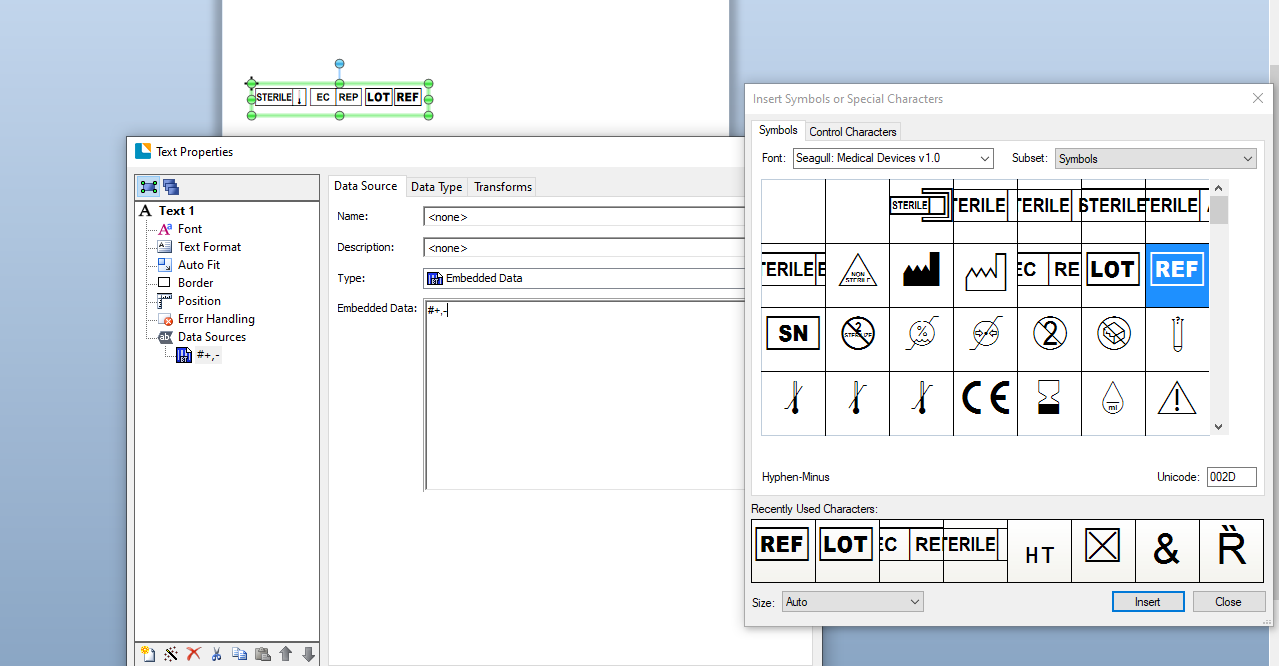
A new version (v2) was released with the latest version of 2021 that includes some recent additions such as for Sterile Barriers and if you need those for your labels, you may want to ask the guys at Seagull Tech for a copy or else upgrade to 2021 or install a Trial version of 2021 and a none BarTender PC and the font will appear in the Windows Fonts in Control Panel
0 -
Hi Richard,
Welcome to the BarTender Community Forums!
Thank you for bringing this to our attention. The BarTender version you are currently using is not up to date; I understand BarTender 2019 R10 offers quite a few bugfixes, could you try updating your BarTender version to the latest release? If this does not fix the issue, please, do come back to us and we can continue the bug reporting process from there. You can find our latest BarTender service releases in our Download Webpage; also, please review our article on How to Update BarTender to the Latest Revision before updating your BarTender version from BarTender 2019 R9 to R10.
Finally, as a sort of workaround, have you tried adding these boxes as shapes from BarTender Designer's upper menu? Depending on what you are looking for, this could satisfy your design needs, as these are very customizable: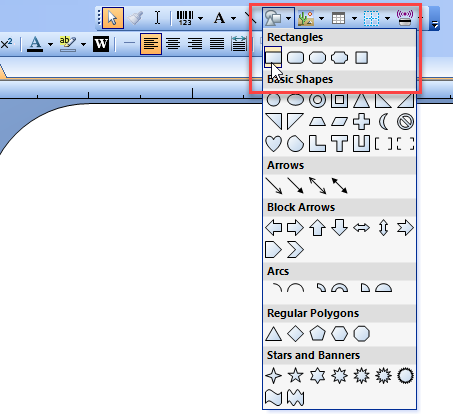
Let us know if updating to the latest revision did the trick!0


Bitte melden Sie sich an, um einen Kommentar zu hinterlassen.
Kommentare
2 Kommentare