FNC1 character ^1 not working

Hi Experts,
We are using BARTENDER ITF for a barcode where in we are using AI code 15 best before date, AI code 10 batch and AI code 37 for quantity. Bartender is sending the seperator as ^1 after batch value. We are getting the label printed with the help of a SMARTFORM. When we scan the value is not getting split and ^1 is taken as a continuous value instead of a splitter. Please guide.
The matter in the barcode is 152202040510AB102^137140 , where 15, 10 and 37 are the AI identifiers.
Br,
Satyander
-
I dont think ITF includes a Function 1 character in its character set. It looks like you should be creating the label wit a GS1-128 barcode symbol instead.
You will however need to amend your date as there are only 6 characters allowed in a date and it must be in the format YYMMDD
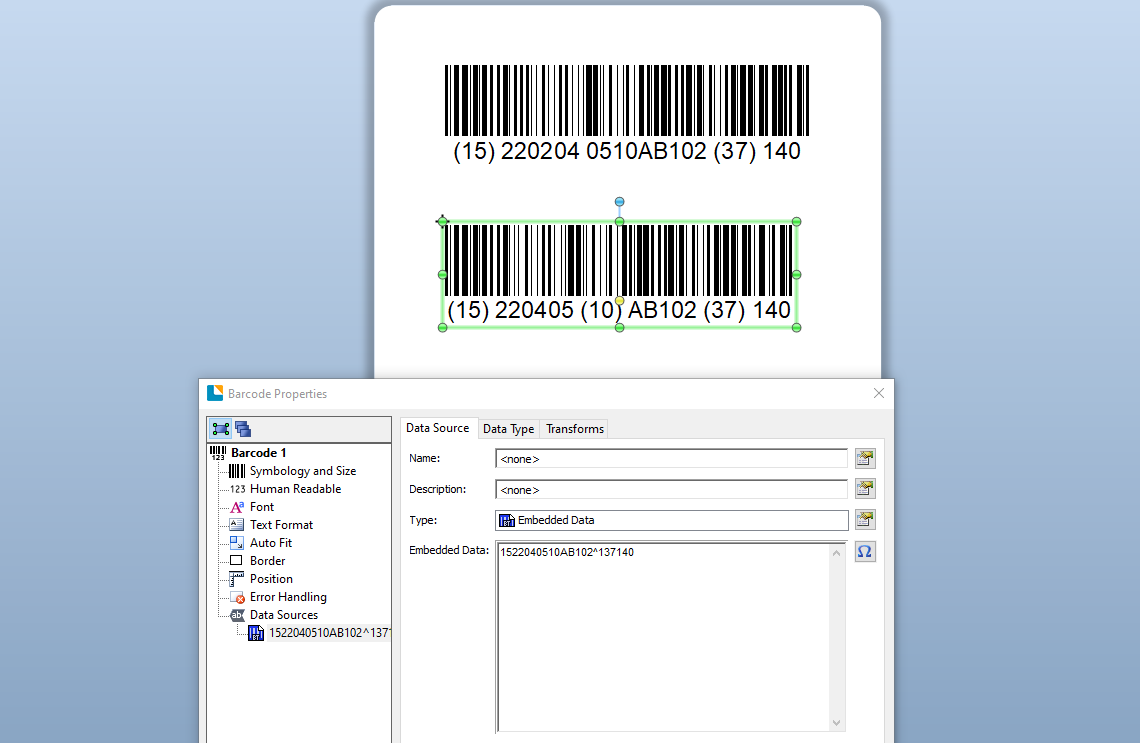
In the screenshot below, for the bottoms barcode I have removed the 20 from the 22200405 date element in the string
 0
0

Bitte melden Sie sich an, um einen Kommentar zu hinterlassen.
Kommentare
1 Kommentar