/PrintJobName= always appends template name before printjobname

Hi,
I am trying to automate PDF printing via PDFCreator.
Automating bartender via Command line, using
bartend.exe /f="c:\temp\test.btw" /p /prn="PDFCreator" /PrintJobName="72120204" /x
always creates a file named test72120204.pdf
I paused the PDFCreator printer and saw the job is being created by Bartender as test72120204, so PDFCreator is just doing a proper job with renaming.
I would like to strip away the template name from the resulting file without doing any VB task post-processing the file.
Can you please help me solving this issue?
Thanks in advance
-
That looks to me to be something in PDFCreator that is doing that.
I am guessing you are using an older version of BarTender that does not have in built PDF driver as with that you can control the file name format based on a few options. With this you could for example make make the file name a non printable field on the label, and Name that field allowing you to configure the file name output to use that Named value. If the were saved connected to the PDF driver then the PRN= command would not be required.
1 -
Thanks a lot Pete.
I didn't know there was a PDF driver built-in, so I started using it and with further debugging I was able to solve the issue with both drivers. So far, I will uninstall PDFCreator and use this one instead. I am on BarTender 2021 R8.
0 -
Glad you are up and running. I assume you are aware that 2000 pdf labels = 1 printer slot on the licence (resetting after 7 days)
0 -
Thanks a lot Peter.
We are up and running for almost 20 days now. I am rewriting the automation part using Active but I am not sure how to manage /prn="PDF" /PRNFILE="c:\test\testfile.pdf":
I tried setting
btFormat.Printer = "PDF"
btFormat.PrinterFile = "C:\temp\testfile.pdf"
Call btFormat.PrintOut(False, False)but it looked like no pdf file was created.
Am I doing it the wrong way? Thanks for your help
0 -
Sorry not sure, but have you tried adjusting these settings in the label itslef?
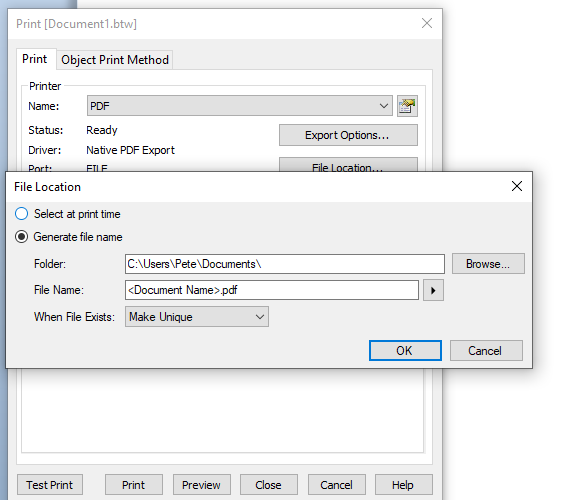 0
0

Bitte melden Sie sich an, um einen Kommentar zu hinterlassen.
Kommentare
5 Kommentare