HF RFID tag on Datamax M-4308 Mark II

Our customer has this equipments: BarTender Professional 2016 version 11.0.7.3146 (R7) HF RFID Printer Datamax M-4308 Mark II, driver version 2018.1 HF tags He programs HF RFID tag. Formerly he wrote down 20 bytes to HF RFID tag. It was all rirght. Now, he need write 100 bytes to HF RFID tag. But it is not possibly. In cooperating with Honeywell (Datamax) technicians was found when it is writing over 64 bytes then print output file (from BarTender) contains the command STXKcRIn512. When we deleted this command from print output file then it is all right and HF is printing and programming. We preformed test with BarTender 2021 and printer drivers version 2021.3. Problem is same. According to Honeywell technicians, the command syntax is incorrect. In addition, it is designed for UHF tags. No for HF tags. Can you please solve this problem? Thank you in advance for reply. Our customer has this equipments: BarTender Professional 2016 version 11.0.7.3146 (R7) HF RFID Printer Datamax M-4308 Mark II, driver version 2018.1 HF tags He programs HF RFID tag. Formerly he wrote down 20 bytes to HF RFID tag. It was all rirght. Now, he need write 100 bytes to HF RFID tag. But it is not possibly. In cooperating with Honeywell (Datamax) technicians was found when it is writing over 64 bytes then print output file (from BarTender) contains the command STXKcRIn512. When we deleted this command from print output file then it is all right and HF is printing and programming. We preformed test with BarTender 2021 and printer drivers version 2021.3. Problem is same. According to Honeywell technicians, the command syntax is incorrect. In addition, it is designed for UHF tags. No for HF tags. Can you please solve this problem? Thank you in advance for reply.
-
Hello Vaclav,
Thank you for reaching us via the Community Forums and reporting this issue!
This issue would need some investigating on our part. As a temporary measure, we would recommend using the Search and Replace action to modify the code sent to the printer at print time, this way it could erase the STXKcRIn512 command: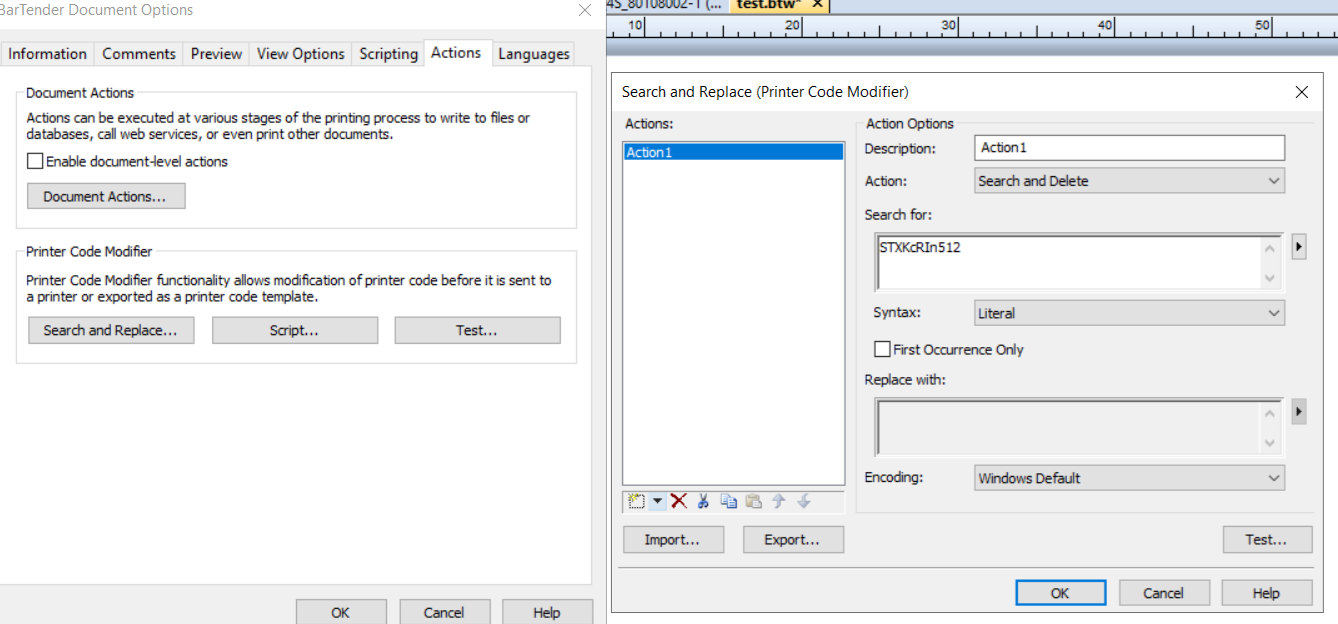
In the meantime, if you have an active maintenance and support agreement with us, we would recommend opening a ticket with us via the Support Portal. Please, make sure you have your Support Number with you (you can locate it in the Help > About menu in BarTender Designer), as our support engineers will need it to verify your maintenance and support contract status.
Thank you!0

Bitte melden Sie sich an, um einen Kommentar zu hinterlassen.
Kommentare
1 Kommentar