GS1-128 scrambles my SSCC18

I found a bunch of posts asking about the generation of the SSCC barcode, but they where all 5+ years old.
I'm using 2021 R8 and I'm writing an integration that will read a list of labels from a CSV file created from a power app that will be scanning SSCC18s from labels that are generated from our Serialization system.
So when I'm passing 00703650380000003812, it's showing me (00) 7 0365038 000000381 2 2 and I'm not sure how to stop it from giving me the second 2.
I'm using the GS1 shipping label template that comes with Bartender 2021 and just modifying for my purpose.
Thanks in advance for the assistance.
-
As a GS1-128 required a check digit, BarTender is automatically calculating the check digit from the first 17 characters and then appending it to the these and then adding your 18th digit to the end of this.
What you need to do is either not send the check digit (18th character) or else tell BarTender to ignore it, via Transforms>Truncation and Discard Character on Right = 1
0 -
Maybe I'm missing the point of the check digit. My packaging line will create an SSCC18 pallet label using GS1-128 symbology (with bartender), and my process is for my shipping team to scan that SSCC18 from the packaging line and include specific shipping info onto a shipping label.
So calculating a new check digit seems to be my issue here. I've looked at the .btw file my packaging line uses, but haven't been able to look as closely at the configuration of my packaging line and the values it sends for the pallet label.
dropping the last digit doesn't seem to fit as a solution for me, hoping for some other things to look at.
0 -
Your system is sending all 20 characters, namely the 00 application identifier and the 18 digits of the code. BarTender is configured so that the code must include a check digit and so will automatically calculate the check digit that will become the 20th character. Effectively this means that the 20th character you are sending is superfluous and BarTender is thinking it is the start of a new application identifier and so to correct the code you need to remove this from the input by using the truncation as mentioned.
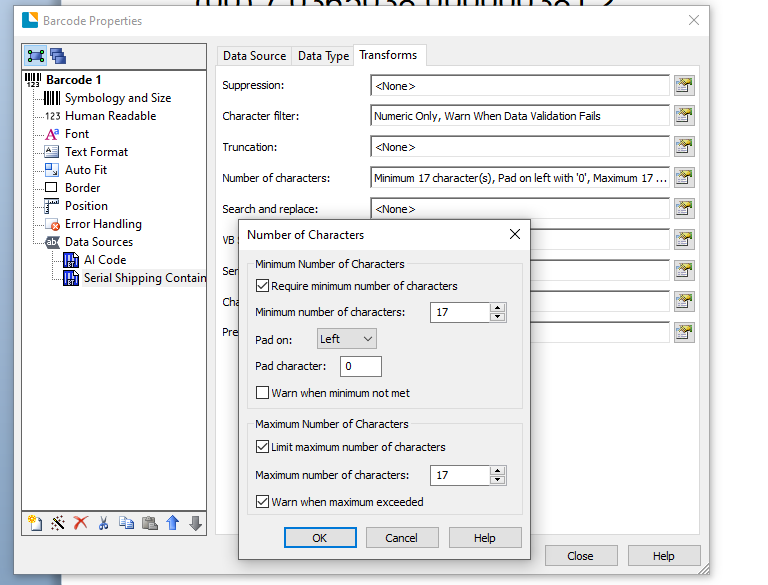
If you use the Wizard to create the barcode you will see that this automatically builds in the minimum and maximum number of characters (17 in this instance as the 00 AI is in a separate substring), per the image below. However as you are sending down the full string then you can not use the wizard in this instance but must replicate this by removing the last character.
 0
0 -
I was starting to think about having my front-end guy setup his power app to parse the SSCC that it scans into chunks but haven't gone that far yet.
The power app is going to collect our route info common to the shipment from keyboard input but then scan several SSCCs at once and pass it off to an integration as a CSV file.
But i'd be better off using the wizard and changing my shipping label from this to your screenshot?
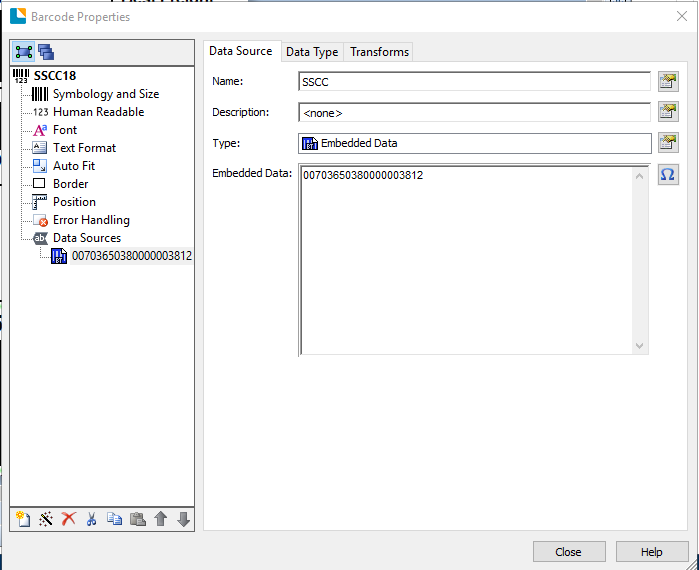
I was noticing with integration builder that when reading from a CSV source it seemed to drop the leading 0's on me anyway.
I'll give this a try this afternoon.
0 -
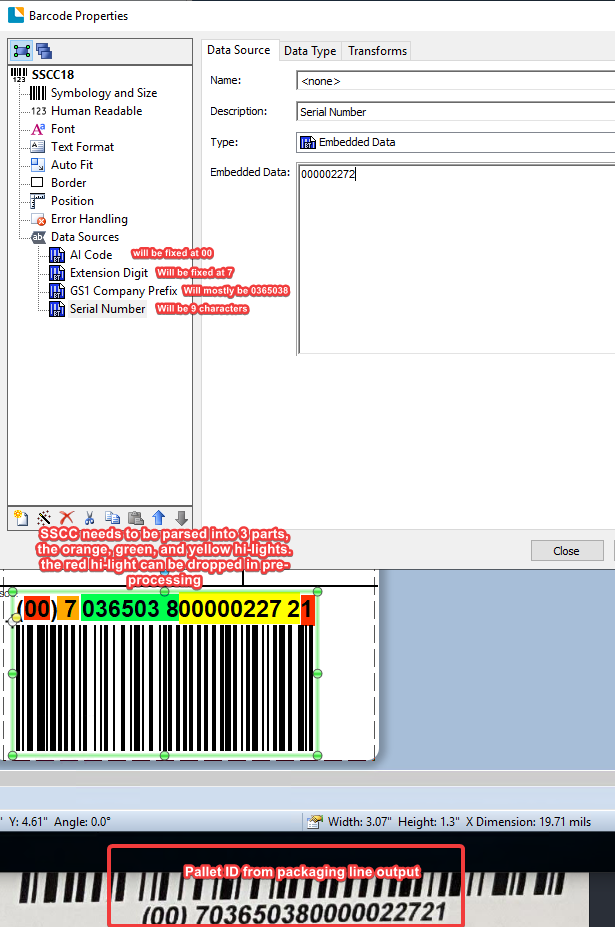
Yeah, that's what I needed to do. I'm going to have my front end guy parse out the SSCC and give it to me in pieces:
thanks for the clarification Pete!
 0
0 -
As long as you are truncating characters to right 1 then you should be okay. However if a zero is being stripped off the start for some reason then this could create other issues and so if it is an easy adjustment to output just the data element and not the AI too then that would get round this. The 00 AI could just be an embedded substring with the output digits populating a second (truncated) string.
0

Bitte melden Sie sich an, um einen Kommentar zu hinterlassen.
Kommentare
6 Kommentare