Send serial number to file (excel,csv, txt)

Hello, I wouldlike to ask you about support. I have label with DMC with serail number. I need:
1) scan DMC with serail number and print new label with this serial number
2) Save (export) scanned serial number to file (excel or txt, or csv.....)
Is there any possibility how I can export scanned number to file?
Thank you very much for your support.
Martin
-
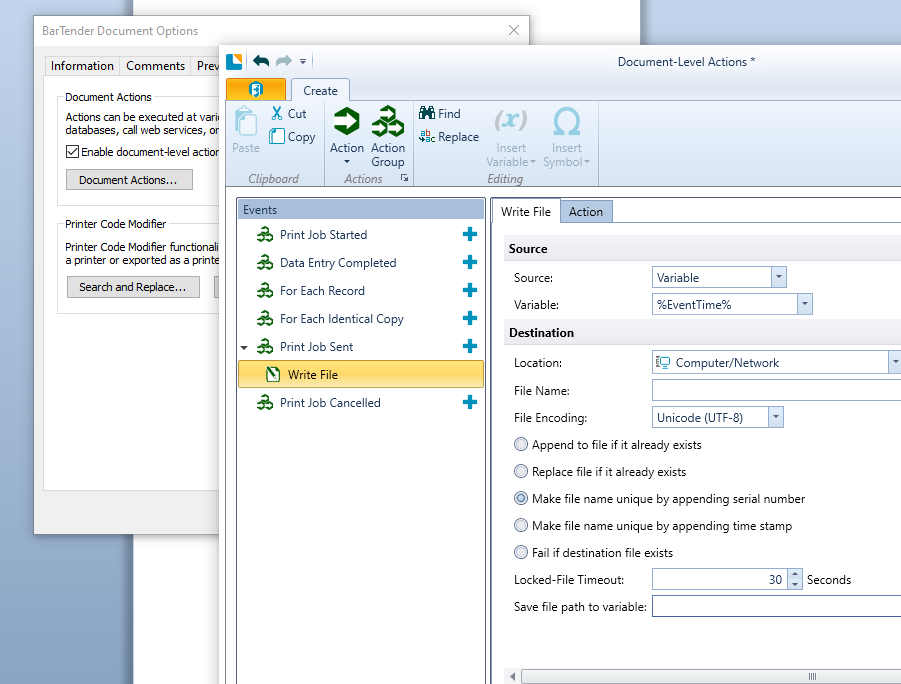
Depending on your version and edition of BarTender, you could use logging, from the Administer>Log Setup menu option to output the serial number to a CSV file, or else configure an Action from the File>BarTender Document Options menu item
 0
0 -
Hello Pete,
thank you for your info. Now I am using BarTender Designer 2016 R3, Enterprise Automation Demo. I have tried it, and it seems it is works (the first version with "Administrator ->Log setup...." but I am able to send it to txt file.
Thank you
0 -
I dont think the Action options are there in 2016 as these may have come in with 2019. There is a a 3rd option I forgot about and that would be to use VB Script to write out the data to a file but if your requirements are just one piece of data then the log option would be the simplest method I would suggest.
0

Bitte melden Sie sich an, um einen Kommentar zu hinterlassen.
Kommentare
3 Kommentare