How to avoid raster text print?

Hi, I have to export the output of Bartender designer as raw TEC printer code.
I saw in the TEC code that all text labels are converted to bitmap/raster images. How is possibile to avoid this transformation and keep a raw text?
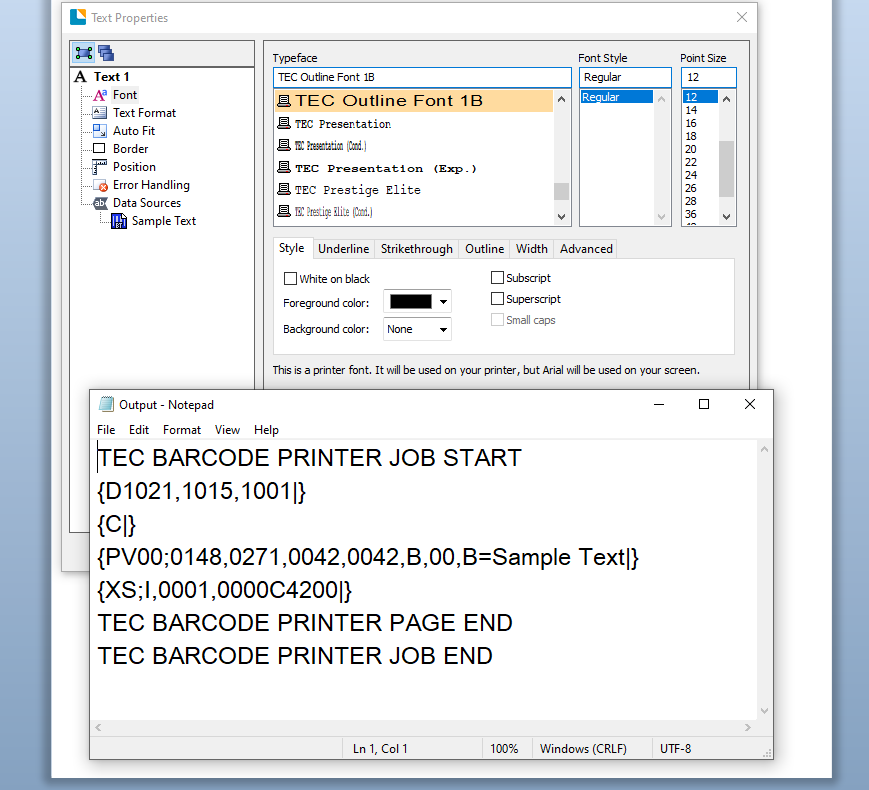
I have selected a TEC font and in label box I see "printer font" and in print options / methos I have set "text output" to True Type texts.
Is there something else I can do to force a raw text instead of raster?
-
By default BarTender would normally send the data down in plain text format unless you are using a font that is not present on the printer or the user running BarTender has not got full rights to the driver in which case the program may not be able to access the fonts and so will then send them down as a graphic.
This is what I receive as a output using a Tec 852 Seagull driver.
I would suggest that you make sure you are using a Seagull driver and you could also try changing the font used and see what happens.
 0
0

Bitte melden Sie sich an, um einen Kommentar zu hinterlassen.
Kommentare
1 Kommentar