When switching print jobs, Bartender seems to set printers to Thermal Transfer (as opposed to required Direct)

Hello,
We have a number of labels printing through Bartender. An issue we have noticed arise in the past month is that when we switch between label jobs, the printer seems to reset to Thermal Transfer as opposed to Thermal Direct. We use external systems to create trigger files for Commander but have ruled these systems out as a cause of the issues, as printing straight out of Bartender seems to cause these issues as well.
We have also tried setting the document stock settings to Thermal Direct, as well as "Share settings between all documents" check. It appears that the reset occurs AFTER a print job completes?
Also, I had come across a question entered 9 years ago under the title "Thermal Printer Settings Always Reverts Back To Direct" which did not note any solutions that would work for us, as we had tried the solutions noted already.
If anybody could provide some guidance on this we would greatly appreciate it. Thank you!
-
A couple of things you could check is that this setting is not configured as the default for the printer drivers in Control Panel.
If the printer has a LCD display and on board, make sure the printers are set to Direct and then in the label configure the stock to Use Current Printer settings

That was BarTender will not send a command down that adjusts the sensor setting.
0 -
Pete Thane - it doesn't look like there is an option for me to reply to you - however, we have tried those settings. The printer does have an LCD display and it is through that display that the users are able to see that it switched from direct to transfer (we change it through the control panel on the server, though). Those Bartender settings were all tried as well.
0 -
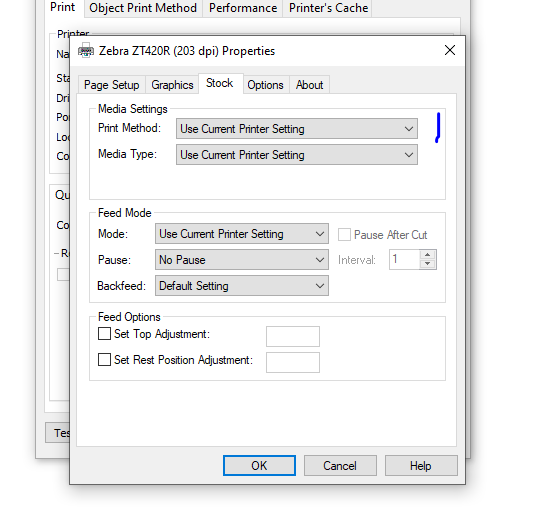
If the front panel settings are changing then the software/driver that is sending the sensor selection command. I juts realised I scanned the Options and not Stock tab as it is this setting that needs to be adjusted.
 0
0 -
I would also suggest opening the label, making sure the Print Method is set to either Current Printing Setting (if LCD is set to Direct) or the it is set to Direct on the drop down and then close the print screens and save the label.
0

Bitte melden Sie sich an, um einen Kommentar zu hinterlassen.
Kommentare
4 Kommentare