Is it possible to have multiple data sources for one AI in a GS1-128?

Hello,
I am trying to build a GS1-128 with the wizard, but it's not printing correctly. Wondering if it is possible to remove the (10) AI for every additional data source.
What I want:
(01)GTIN (17) YYMMdd (10) YYMMdd HHmm, location, internal location
What I get:
(01)GTIN (17) YYMMdd (10) YYMMdd (10) HHmm (10) location (10) Internal location
When I remove the (10) AI for every data source except the first, this is the result:
(01) GTIN (17) YYMMdd (10) (21) 1104 (10) 42 location, internal location
(01) GTIN (17) YYMMdd (10) (YY)MMdd (HH)mm location, internal location
Is this possible, or am I doing something the program isn't meant to do?
-
Hi Teresa,
Thank you for reaching us in our Community Forums.
GS1 barcodes have to meet very specific requirements and sometimes unexpected digits are added. However, unless you have a specific business need to use the GS1-128 barcode symbology it might be easier to simply use the normal Code 128 symbology.
Would this be an option?0 -
The AI wizard only works when you are creating codes where the data meets a set requirement and what you are trying to do is something out of the ordinary.
I would suggest creating the barcode just with the 01 and GTIN and click NO to append a new Data Source/AI. After that you can then add the separate strings to the barcode individually using the button highlighted in the image below. The only issue with this that this will remove the restrictions encoded in the Transforms for the 10 AI and so you would need to make sure that your data complies with these requirements (ie max alphanumeric 20 characters).
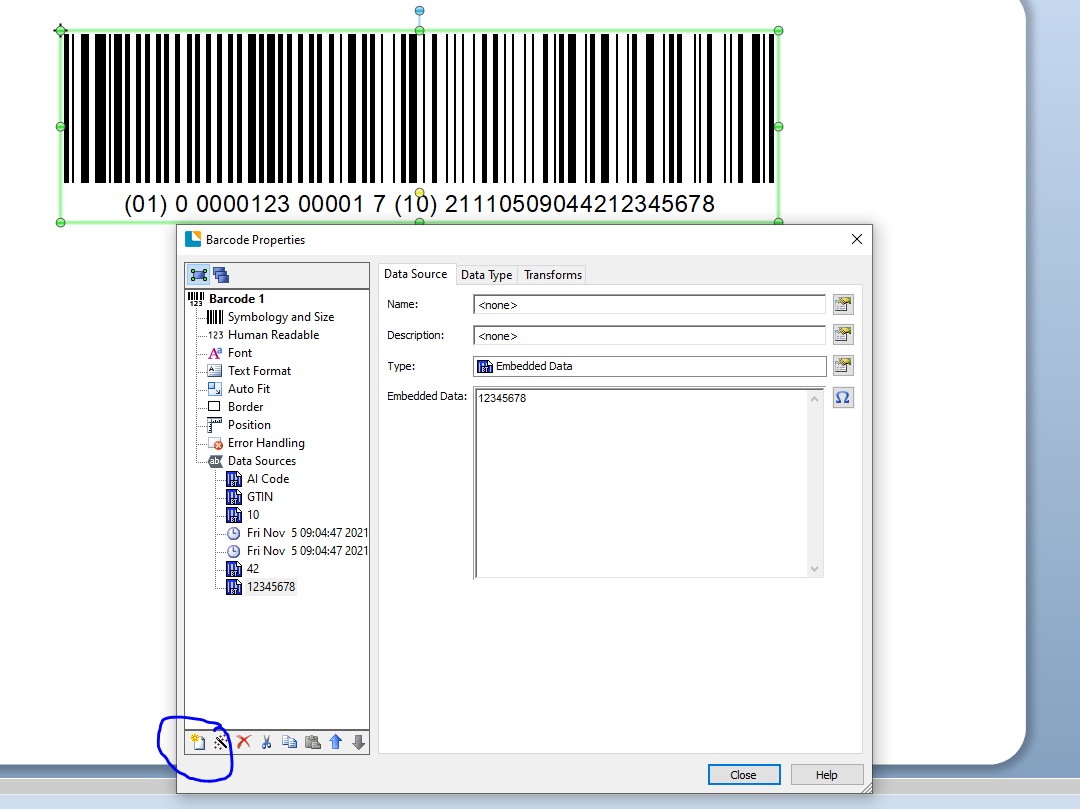 0
0 -
Thank you Pete! I was able to get the barcode built correctly.
0


Bitte melden Sie sich an, um einen Kommentar zu hinterlassen.
Kommentare
3 Kommentare